Meta Ads Creative Fatigue
Facebook ads creative fatigue: how to tell if it's the ad or the account
Three checks on one ad-by-day breakdown, then what Meta itself says to do when the ad really is tired.

By Kaan Catalkaya, Founder of AdCtrl
· · 16 min read
Short answer
- Creative fatigue hits one ad: its CTR falls and its cost per result rises against its own first week while the ads beside it hold. If every ad moved on the same days, it's the account.
- Meta's Creative fatigue flag needs cost per result 2× your past ads and works only in ad sets with one creative, so a clearly tired ad in a multi-ad ad set never gets it.
- Read reach and frequency as two window totals, the first week and the whole run. Daily reach rows can't be summed, because the same people show up on many days.
- Meta's pages read differently on pausing: its Help Centre says keeping the original active may maximise results, its developer docs list pausing it as an example action. We keep it running.
- Judge whole weeks, then test the gap. In our example, 1.9% on 29,400 impressions against 1.1% on 22,600 is far outside chance; on 500-impression weeks it wouldn't be.
Creative fatigue on Facebook ads is one ad wearing out: its click-through rate falls and its cost per result rises against its own first week, while its frequency climbs and its reach stops growing. If every ad got worse on the same days, the account or the auction got pricier instead.
The worked example uses made-up data: a plainly tired ad that Meta's own flag would never mark, because its ad set has three ads, and its sales objective rules out the pre-publish warning.
We run a performance agency and build AdCtrl, which reads Meta ad reports in Claude or ChatGPT. Account-wide CPM rises are in our CPM guide.
Checked 14 November 2026 against Meta's Help Centre and developer docs1.
- 2× cost per result vs your past ads before the flag appears1
- 1 creative the only ad sets Meta's Creative fatigue status covers
- 1.8× example: Ad A's cost per result, week 4 vs week 1, never flagged
- 3 checks first week, reach windows, the ads beside it
What is creative fatigue on Facebook ads?
Creative fatigue on Facebook ads is Meta's name for an ad people have seen too often. Meta says it "occurs when an audience has seen the same creative too many times", so people may engage less and the cost per result can go up1. Its developer docs describe the trace it leaves: "a falling click-through rate and a rising cost per action"2.
Meta's fatigue status counts every recent exposure of the image or video, including exposures from other campaigns on your Page. So a video you run in three campaigns can be more worn out than any single ad's frequency suggests.
Fatigue has four look-alikes, and each of the five leaves its trace in a different place.
How do you know creative fatigue is the problem?
Creative fatigue is the problem when three checks agree: the ad is worse than in its own first week, its frequency rose while its reach stalled, and the other ads in the same ad set held steady on the same days. You need access to Ads Manager, an ad with at least two full weeks of delivery and, ideally, two or more other ads in its ad set.
Meta suggests analysing performance "over at least a full week"4, so every check compares whole weeks. One bad Tuesday tells you nothing.
Compare the ad with its own first week.
Manual: in Ads Manager, open the ad set's ads, set the date range to the ad's first full week and note its CTR and cost per result. Then set the range to the latest 7 days. A lower CTR and a higher cost per result is the first sign.
With AdCtrl: write "For the Meta ad YOUR AD, compare CTR, spend and results in its first full week with the latest 7 days, and work out cost per result for both."
Read reach and frequency as two totals.
Manual: set the date range to the ad's first 7 days and note reach and frequency. Then set it to the ad's whole run and note them again. Don't add up daily reach rows instead: reach counts unique accounts5, and the same person shows up on many days. Frequency, impressions divided by reach, rising while reach barely grows means the same people keep seeing the ad.
With AdCtrl: write "For the Meta ad YOUR AD, show reach and frequency for its first 7 days and for its whole run so far, as two totals, not a sum of days."
Check the other ads on the same days.
Manual: select every ad in the ad set, use the Breakdown menu to split by day, and compare CTR and cost per result across them. If the others held while one slid, it's that ad. If they all slid together, go to the next section.
With AdCtrl: write "For every ad in my Meta ad set YOUR AD SET, show daily CTR, spend and results for the last 28 days, and tell me which ads moved on the same days."
How big a drop counts? Meta gives no number for a drop against the ad's own first week, and we don't use one either. We call an ad tired when its CTR and cost per result have moved the wrong way against its first week for two whole weeks in a row, while the other ads in the ad set held.
Compare two Ads Manager reports
Export two complete weeks at ad level with the same attribution setting and result type. Use English CSVs with Ad ID or Ad name, Amount spent, Impressions, Link clicks and Results. Include Reach if you want to compare frequency. Leave breakdowns off so each ad has one row per period.
Formula: Cost per result = CPM ÷ (1,000 × link click rate × results per link click).
Worked example
In the example, spend and impressions hold steady. Link clicks fall from 360 to 180 and results fall from 12 to 6. Cost per result doubles from $15 to $30, driven by fewer clicks per impression.
Worked example: a tired ad Meta never flags
Take a made-up sales ad set with three ads over 28 days, example data rather than a real account, so its results are purchases. Ad A is a studio video, Ad B a customer photo and Ad C a carousel.
Example data for a fictional ad set. Ad A's CTR slides week by week, from a 1.9% to a 1.1% weekly average, while Ads B and C and the ad set's CPM stay flat on the same days: one tired ad, not a pricier account.
| Week | Ad A CTR | Ad A cost per result | Ad B CTR | Ad C CTR | Ad set CPM |
|---|---|---|---|---|---|
| 1 | 1.9% | $18 | 1.5% | 1.3% | $9.80 |
| 2 | 1.7% | $20 | 1.5% | 1.3% | $10.10 |
| 3 | 1.4% | $25 | 1.5% | 1.4% | $10.00 |
| 4 | 1.1% | $33 | 1.4% | 1.3% | $10.20 |
Example data, the weekly averages behind the chart. Ad A loses 0.8 points of CTR and its cost per result rises 1.8×, while the other two ads and the ad set's CPM barely move.
Source: Example data for a fictional ad set, not a real account. The three checks are our method; the signals follow Meta's description of fatigue2.
- 1.9% → 1.1% example: Ad A CTR, week 1 to week 4
- 21k → 26k example: Ad A reach to date, day 7 to day 28
- 29.4k → 93.6k example: Ad A impressions to date, day 7 to day 28
- 1.4 → 3.6 example: Ad A frequency to date, day 7 to day 28
In this example, Ad A reached only 5,000 more people after its first week while its impressions more than tripled, so mostly the same people kept seeing it. Ads B and C held their CTR and the ad set's CPM stayed near $10. All three checks agree: Ad A is tired, and the account isn't.
Is the CTR drop bigger than chance? This is a calculation on the example data. Week 1 had 29,400 impressions at 1.9%, so 559 clicks. Week 4 had about 22,600 impressions at 1.1%, so 249 clicks (derived from Ad A's $231 of spend at the ad set's $10.20 CPM).
The CTR calculator's A/B test gives p far below 0.0001 for those example numbers (a two-proportion z-test: z = −7.31, p = 2.74E-13). The p-value is the chance of a gap at least this big if the ad's real CTR hadn't changed at all.
With roughly the same drop on 500-impression weeks, 10 clicks against 6 (2.0% against 1.2%), the same test gives p = 0.313, and the drop could be noise. On a small ad, wait for more impressions before you call it.
Is it fatigue or did the whole account get more expensive?
The whole account got more expensive when every ad and ad set moved on the same days. Fatigue shows in one ad while the ads beside it hold. Meta explains why costs can creep up with no change to the creative: delivery takes the cheapest opportunities first, so "you may see costs increase over the schedule of your campaign or ad set"4.
Fatigue if
- One ad's CTR fell against its own first week
- Its frequency rose while its reach stalled
- The other ads in the ad set held on the same days
The account if
- Every ad and ad set got pricier on the same days
- CPM rose across the account, not in one ad
- Results fell on every campaign on the same day
Not enough data if
- The ad has less than two full weeks of delivery
- You're reacting to one bad day
- The ad set has one ad and nothing to compare it with
For the account branch, Why is my CPM so high on Facebook ads? works through the causes that hit every ad set at once. If results fell on every campaign on the same day, check tracking first with Facebook ads not converting.
Meta calls it the "breakdown effect" when advertisers misread the system as shifting spend into underperforming ads, and says that with several ads in one ad set you should "evaluate your results at the ad set level"6.
So use the sibling comparison to date the fatigue, rather than to pick an ad to switch off. Leave the tired ad running, add a new one beside it, and judge the ad set's total cost per result.
If the campaign shifted spend between ad sets while the ads themselves held steady, check how Meta allocates a shared campaign budget.
What does Meta's Creative fatigue status mean, and when won't you see it?
Meta's Creative fatigue status is a label in the Delivery column of Ads Manager, for an ad set or an ad. It appears when the ad's cost per result is at least twice that of ads you ran in the past, and Creative limited appears when it is higher than your past ads but under twice1.

Screenshot of Meta's Business Help Centre, 14 November 2026. Meta defines fatigue by exposure, and the boxed note limits the status to ad sets with one creative; cost per result against your past ads sets the line.
What the flag needs
An ad set with one creative, and not dynamic creative, an Advantage+ catalogue ad or an Advantage+ app campaign. Cost per result at least twice your past ads.
An ad set with several ads
Several ads in one ad set, so the flag never appears.
In the worked example, Ad A would show nothing: its ad set has three ads. Its 1.8× rise is measured against its own first week, while Meta's 2× line is against your past ads, so the two aren't the same test. Either way, the flag misses fatigue in any ad set with several ads, and the three checks don't have to wait for it.
Before launch, Ads Manager can also warn you when fatigue may set in during a campaign's first week, but only for an ad set with one creative, and not with the sales objective.
For developers, Meta's Ads Webhooks send a creative_fatigue event "when an ad’s creative fatigue level changes", with the level as LOW, MEDIUM or HIGH2. Meta's page doesn't say whether it covers ad sets with several ads.
What frequency is too high?
No frequency is too high on its own, because Meta gives no cut-off. Its Frequency page says frequency "may average 1 to 2 per ad set or may be much higher, depending on your budget, audience size and schedule", and treats it as a warning sign "if performance begins to drop as your frequency numbers rise"7.
Cut-offs you'll see in other guides are rules of thumb, not Meta's. We don't use one, because frequency means fatigue only next to a falling CTR.
| Frequency to date | Reach to date | CTR and cost per result | Reading |
|---|---|---|---|
| Rising | Barely growing | CTR down, cost per result up | Fatigue likely: run the sibling check |
| Rising | Barely growing | Holding | Not tired yet: check again next week |
| Flat | Still growing | CTR down | Probably not fatigue: look at the offer, the landing page or the placement mix |
| Rising in every ad set | Barely growing everywhere | Down everywhere | The audience or the account: see the CPM guide |
Frequency only means fatigue when it rises next to a falling CTR and a reach that has stopped growing. Read both for the same window.
Source: Meta Business Help Centre on frequency and on metrics that don't add up7, 5; the readings are our method.
Should you pause a fatigued ad or add a new one?
Meta's Help Centre lists three fixes for a fatigued ad, and the first is a new ad beside it, with the old one left running. Meta recommends a new ad with "a new image or video that is materially different from the original creative".
Meta's developer docs read differently on what to do with the old ad.
Meta's Help Centre
"Keeping your original ad active instead of pausing or turning it off may maximise results."1
Meta's developer docs
"Pause the fatigued ad and launch a refreshed one." Or: "Swap in a new creative on the existing ad."2
We follow the Help Centre, the page written for advertisers. A swap or a new ad restarts learning either way, so we keep the old ad running and add the new ad beside it.
Meta lists "Adding a new ad to your ad set" and "Any change to ad creative" among the significant edits that send an ad set back into the learning phase3. Make the change once, with the new ad ready.
By Meta's wording, a different ad means a new image or video. A new headline on the same video doesn't count. In our view, materially different means a different format or angle too, such as a customer video next to a studio one. Check the new ad's text lengths in the ad preview tool before you build it.
Meta's other two fixes are to expand the audience to "reach new people who have not seen your ad too much yet" and to try Advantage+ creative, which it offers only for traffic or sales campaigns with a website destination.
What about the old ad later? Leave it running while the new one gets a full week of results, then decide. Meta's significant-edits list doesn't name pausing a single ad, so we can't tell you whether pausing it restarts learning.
Run the test in one chat
The three checks fit in one chat: one read returns every ad by day, and window reads return each ad's reach for its first week and for the whole window. If the ads started on different dates, each ad's first week needs its own read. AdCtrl reads Meta performance reports down to the ad, and a report changes nothing in the account.
For every active ad in my Meta ad set YOUR AD SET, show daily spend, impressions, results, CTR and CPM for the last 28 days. Then show each ad's reach and frequency for its first 7 days and for all 28 days as two totals, work out cost per result per week, and tell me which ads moved on the same days.
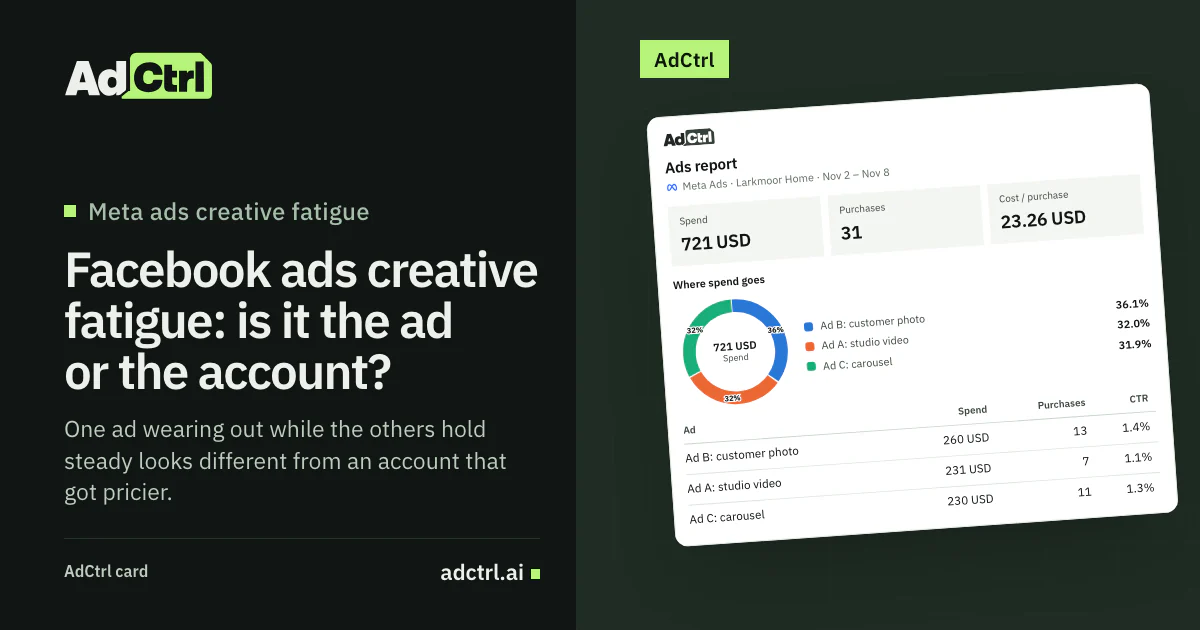
Made-up example data for a fictional sales ad set, week 4 by ad: Ad A got 7 purchases for $231 while Ads B and C got 13 and 11 for similar spend, so Ad A is the tired one. The read returns spend, purchases and CTR; the card's Cost / purchase tile (23.26 USD, made-up) is the whole ad set's spend divided by its purchases.
Claude or ChatGPT does the comparison. The report brings the numbers, and the AI lines them up against the three checks. If Ad A is tired, build the replacement as a new ad beside it.
AdCtrl can add it to the same ad set as a new ad, built from an image or video already in your account. It starts paused, and turning it on is a separate spending change with its own approval. If you later decide to pause the old ad, AdCtrl previews that as an edit before anything changes. Read the Delivery column and the ranking columns in Ads Manager.
Checklist before you replace an ad
Go through these before you replace an ad, before you pay for new creative or pause anything. A line you can't tick sends you back to the section it came from.
- The ad has at least two full weeks of delivery
- You compared whole weeks, not one bad day
- The ad's CTR is lower than in its own first full week, and the gap passes an A/B test
- Its cost per result is higher than in its first full week
- Its frequency to date rose while its reach to date barely grew
- The other ads in the same ad set held steady on the same days
- CPM didn't rise in every ad set on the same days
- Results didn't fall on every campaign on the same day
- No new ad or creative change in the ad set in the days before the drop
- The new ad uses a new image or video, clearly unlike the old one
- You've planned for the ad set to re-enter learning
Frequently asked questions
How long does it take for a Facebook ad to fatigue?
Meta gives no number of days. Its Frequency page ties frequency to "your budget, audience size and schedule"7, so a small audience on a big budget sees the same ad sooner. For an ad set with one creative outside the sales objective, Ads Manager can warn you before you publish when fatigue may set in within the first 7 days.
Do the quality rankings show creative fatigue?
Not reliably. Meta's ad relevance diagnostics, which replaced relevance score, aren't available for ads with fewer than 500 impressions and "aren't inputs into the ad auction"8. They assess the ad over the date range you pick, so a ranking that falls across weeks can back up the three checks, but the test doesn't depend on them. Read them in Ads Manager at ad level.
Should the new ad go in the same ad set or a duplicate ad set?
Meta's pages we read don't compare the two. We add it to the same ad set, so the original keeps running beside it and the sibling check compares the two on the same days. The ad set relearns, because Meta lists adding a new ad among its significant edits3.
Can AdCtrl warn me when an ad starts to fatigue?
No. It doesn't watch your account or send alerts; it reads Meta reports when you ask in Claude or ChatGPT. For an automatic signal, a developer can subscribe an app to Meta's creative_fatigue webhook, though Meta doesn't say whether it covers ad sets with several ads.
What to do next
Before you pay for new creative, check it's the ad. Compare it with its own first full week, read its reach and frequency as two totals, and look at the other ads in the ad set on the same days. If only that ad slid, add a clearly different ad beside it and expect the ad set to relearn. If everything moved together, the problem sits in the account.
To go further, Why is my CPM so high on Facebook ads? covers the account-wide causes, Facebook ads not converting covers tracking and the site, and Meta Ads MCP compares ways to read Meta reports in an AI chat.
To run the three checks in Claude or ChatGPT, see how to connect AdCtrl and start the free trial.
Sources
- About creative fatigue recommendations in Meta Ads Manager, Meta. Accessed 14 November 2026.
- Creative fatigue (Ads Webhooks), Meta for Developers, 17 September 2026. Accessed 14 November 2026.
- Significant edits and learning phase, Meta. Accessed 14 November 2026.
- Understand fluctuations in ad performance, Meta. Accessed 14 November 2026.
- Troubleshoot reasons why ad metrics may not add up, Meta. Accessed 14 November 2026.
- About the "breakdown effect" when advertising on our system, Meta. Accessed 14 November 2026.
- Frequency, Meta. Accessed 14 November 2026.
- About ad relevance diagnostics, Meta. Accessed 14 November 2026.