Meta Ads MCP
Meta Ads MCP: what Meta's official connector can change, and how to lock it down
The 88 documented tools, the rules Meta gives you per ad account, what those rules don't cover, and how other connectors approve a change.

By Kaan Catalkaya, Founder of AdCtrl
· 17 min read
Short answer
- Meta's official ads MCP server is a free, Meta-hosted open beta with 88 documented tools on 4 November 2026, and not every ad account has access yet.
- Meta's server can edit live campaigns and turn ads on; only new campaigns, ad sets and ads start out paused.
- Rules in Meta Business Suite block 7 actions per ad account, including budget edits above an amount you set; check them before you connect.
- Meta's rules have no named action for pixel event rules, A/B tests or lift studies, and don't say whether the targeting-and-audience rule covers custom-audience tools, so your AI app's tool settings are the sure way to block those.
- Meta says an account is unlikely to be banned simply for using its server; the real risk is an assistant with write access and no rules.
Meta Ads MCP is Meta's own connector that lets Claude, ChatGPT and other AI assistants read and change a Meta ad account. It is free from Meta, hosted by Meta and still in open beta. It can edit live campaigns and turn ads on, so set the per-account rules in Meta Business Suite before you connect it1, 2.
I run a performance agency and I build AdCtrl, one of the third-party connectors compared further down, so AdCtrl's limits are in that table too. The Google side is in my Google Ads MCP guide. Checked 4 November 2026 against Meta's developer docs, product page and Help Center3, 4.
- 88 documented tools, 4 Nov 20261
- 7 actions you can block per ad account5
- $0 from Meta to connect
- 3 budget triggers in the rules API
What is the Meta Ads MCP server?
Meta's ads MCP server is a remote server Meta runs at https://mcp.facebook.com/ads that "lets you manage Meta ads directly from an AI agent". MCP (Model Context Protocol) is the standard Claude, ChatGPT and other assistants use to call outside tools, and Meta says its server works with any MCP-compatible agent.
The server is one half of what Meta calls Meta ads AI connectors; the other half is a command-line tool. "Meta Ads MCP" also gets used for third-party connectors built on Meta's Marketing API. This page keeps them apart and calls the official one Meta's server.
- : Meta announces ads AI connectors in open beta
- : Connection through your own Meta app
- : Jon Loomer finds his ad accounts allowed "7 of 7" actions by default
- : Rules through the Marketing API, in an update to Meta's July post6
- : Still open beta; not all ad accounts have access
What can Meta's official server do as of November 2026?
Meta's developer docs list 88 distinct tools across seven category pages, and many of them write. I counted the rows on each category page; the overview's own "Available tools" page was empty when I checked.
| Category | Tools | What the writes touch |
|---|---|---|
| Ad creation and management | 28 | Campaigns, ad sets, ads, creatives, custom audiences and customer lists |
| Catalog creation and management | 31 | Catalogs, products, product sets and feeds, including deletes |
| Signals and datasets | 13 | Pixel event rules and parameters, including deletes |
| Comprehensive reporting | 7 | Read only |
| A/B tests and conversion lift | 7 | Test and lift study set-up |
| Help and troubleshooting | 2 | Read only |
| Activity logs | 1 | Read only |
Five of Meta's seven tool categories can change something; reporting, help and activity logs only read.
Source: Meta's ads MCP server overview and seven tool pages, counted 4 November 20263, 1, 7
Your account may not see all 88. Meta says it is rolling out tool access gradually and tells you to ask your agent which tools you have. Meta's Help Center groups the same work into nine areas, adding custom audiences and partnership ads as their own items.
Ask that first:
Which tools do you have access to on Meta's ads MCP server? Group them into reads and changes.Show spend, results and cost per result for each ad set in my ad account over the last 7 days, compared with the 7 days before.The second prompt should only need the reporting tools. The assistant writes the summary from the rows Meta returns, so check its maths against Ads Manager the first few times.
What can it change in your ad account?
Meta's server can create, edit and switch on campaigns, ad sets and ads, and change audiences, catalogs and pixel event rules. Four tools on the ad management page matter most for safety:
ads_update_entitywill "Update fields on an existing campaign, ad set, or ad", live ones included.ads_activate_entitywill "Change a paused campaign, ad set, or ad to active", which Meta notes "starts spending budget".ads_update_custom_audience_userswill "Add or remove users on a customer list audience by uploading hashed personal data."ads_delete_custom_audiencewill "Delete a custom audience."
Creation is the protected part. Meta's docs say "Write tools create entities in a paused state; your AI client asks for confirmation before activation." Meta doesn't describe ads_update_entity as paused or drafted, so I'd assume a budget or targeting edit on a live ad set can take effect when it is applied1.
Paused or draft: what do Meta's own pages say?
Meta's pages use both words. The developer docs say new campaigns, ad sets and ads are created paused; the product page says new campaigns "are created as drafts by default" and that "all new campaigns are created in a paused state for human review before going live". The Help Center adds an "Ads MCP draft mode" that saves new campaign work for review1, 2, 4.
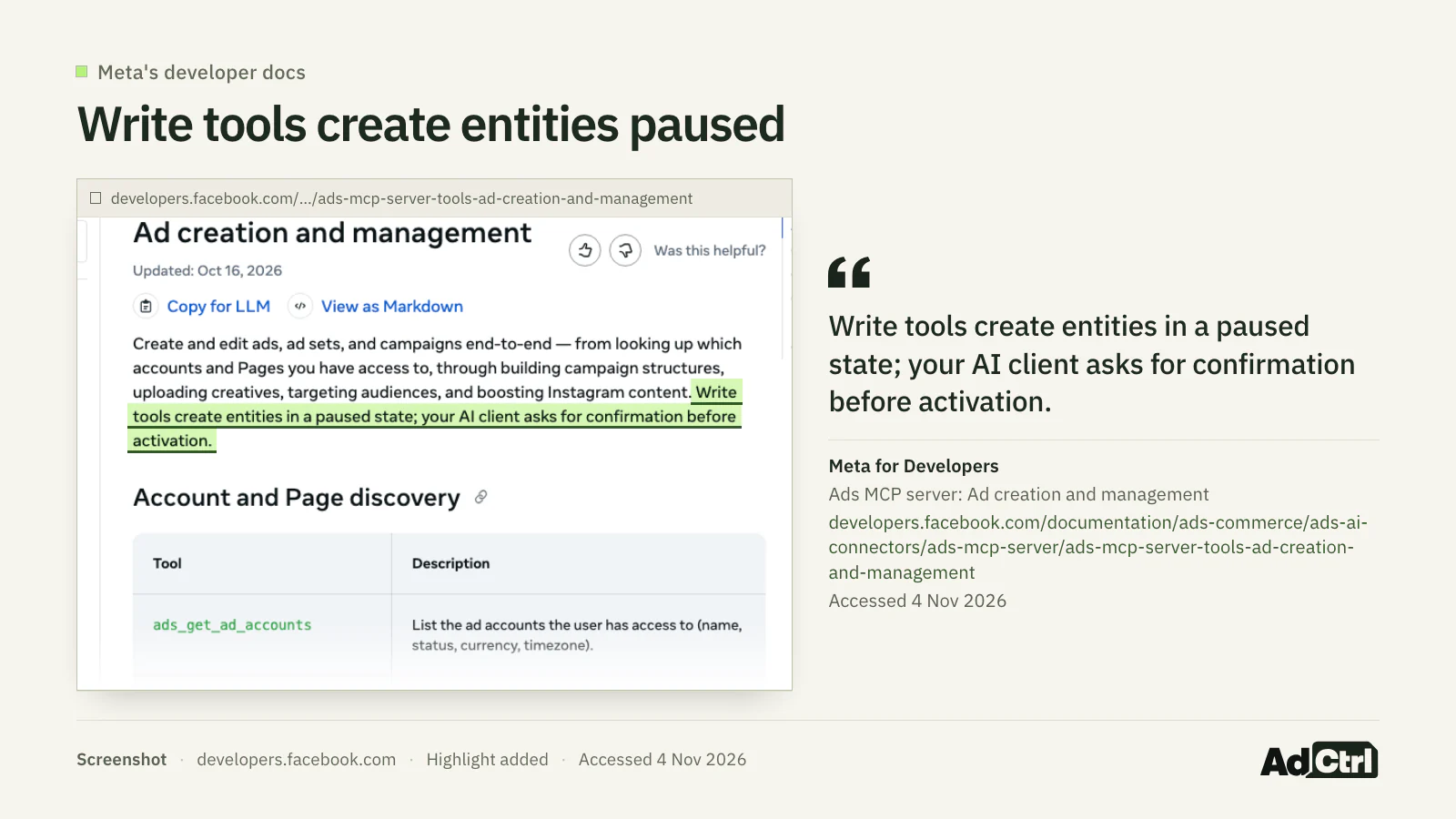
Screenshot of Meta's developer docs, 4 November 2026: new entities are created paused, and the AI client asks before activation.
Either way, Meta's pages agree: nothing new spends until someone switches it on.
Meta also says "Changes require your authorisation through your AI tool" and "Any actions taken on your behalf require your authorisation through the AI agent". About running campaigns, the only thing it says is that draft mode "avoids automatically pausing running campaigns when you make changes", so treat live edits as taking effect once you authorise them2, 4.
Is Meta's server free, and is it still in beta?
Meta charges nothing to connect. The product page says "There's no additional cost from Meta to connect. Your AI tool's own subscription terms still apply." On 4 November 2026 the same page still called the connectors an open beta2.
Meta hasn't said what happens to pricing after the beta. For a beta whose tool list moves, I'd note which tools your account had on the day you set your rules, so you notice when new ones show up.
Why does it say is_ads_mcp_enabled: false?
The account isn't in Meta's rollout yet. Meta's product page says "Not all ad accounts have access yet due to phased rollout", and the Help Center says "If you can't see Ads MCP server, you don't have access to this feature yet".
The flag name is_ads_mcp_enabled: false comes from Pipeboard, which writes that some accounts "still get is_ads_mcp_enabled: false" on Meta's server. Meta's own pages don't use the name, and Meta gives no request form or date for access8.
What you can check, in order:
Ask someone with full control of the business portfolio to open Settings in Meta Business Suite, then Integrations. Meta says those people manage the rules; it doesn't say whether others see the menu.
If Ads MCP server isn't listed there, the business doesn't have access yet, and the rules can't be set either.
If it is listed, open the ad account you connected. Meta doesn't say whether every account listed there is enabled, so try a read prompt against that exact account.
Ask the agent which tools it has; Meta rolls tool access out gradually.
Third-party connectors are an option in the meantime. Pipeboard, for example, says its server "uses the standard Meta Marketing API and works on every account you have access to".
How do you lock down Meta's connector before you connect it?
You lock it down with Meta's rules per ad account, then with your AI app's settings per tool. The rules are set by someone with full control of the business portfolio, and Meta's server enforces them. I haven't tested these rules on my own accounts yet; this section comes from Meta's pages and Jon Loomer's write-up.
Where the rules live
Open Settings in Meta Business Suite, then Integrations, then Ads MCP server. Pick an ad account or catalog and allow or block each action. Once some actions are blocked, the account shows Limited next to "Take actions in this ad account".
Jon Loomer's ad accounts all allowed "7 of 7" actions by default when he checked in August 2026. Meta doesn't document a default, so look at your own count before you connect anything.
The seven actions
My default on a client account would be edit_budget and edit_status blocked, creation allowed. New objects arrive paused, and a person turns them on in Ads Manager. The rules API names seven ad-account actions plus all; a rule only denies, so anything you don't block stays allowed.
| Rule action | What it blocks | Notes |
|---|---|---|
create_campaign | New campaigns | |
create_ad_set | New ad sets | |
create_ad | New ads | |
edit_budget | Budget changes | Block all, or only above a cap; daily, lifetime or both |
edit_targeting | Targeting and audience changes | |
edit_creative | Creative edits | |
edit_status | Delivery status changes, such as turning ads on | Blocking it stops the agent turning ads on or off |
all | Every agent action on that ad account | Also covers tests and lift studies; Meta doesn't say whether it reaches pixel tools |
Seven named actions plus "all" per ad account; catalogs have their own rules for products and product sets.
Source: Meta's ads MCP server rules best practices page, read 4 November 20265
The budget cap
The budget rule has two modes in Business Suite: block every budget change, or block only budgets set above an amount you enter ("Budgets set above this amount"). The API version can trigger on a percentage change, an absolute change or an absolute maximum, and Meta's own example is "deny any budget increase above 20%".
Partners and agencies
A partner with access to your ad account can set its own rules for that account, and those rules only bind the partner's people, "meaning people in the partner business". So an agency's rules don't bind the client's own team, and the client sets its own.
Agencies running many accounts can set rules from code. In a 22 September 2026 update to its July developer post, Meta announced a Marketing API endpoint to manage "agent controls in bulk, across many ad accounts and catalogs at once"; the API doc adds that there is no batch call, so it is one call per rule per asset. It is limited availability: a business that isn't enrolled gets error code 10 on the ad account endpoint and HTTP 403 on the catalog endpoint5, 6.
How the rule types fit together
Meta's pages answer some precedence questions and leave others open:
| Question | What Meta states | Not stated by Meta |
|---|---|---|
all vs the named actions | all denies "Every agent action on the account"; rules only deny, so there is no allow rule for it to conflict with | Whether Business Suite shows all as its own switch |
| Ad account vs catalog | A rule applies to "a specific ad account or product catalog"; catalogs have their own actions | Whether an account rule reaches catalog tools used in its ads |
| Owner vs partner rules | Partner rules apply only to the partner's employees | Whether a partner's rules can loosen the owner's for the partner's people |
| Budget cap: Business Suite vs the API | Business Suite: block all, or budgets above an amount. API: percentage change, absolute change or absolute maximum | Whether Business Suite offers a percentage cap |
| Who can set rules | Business Suite: people with full control of the portfolio, and partners for accounts shared with them. API: enrolled businesses only | Who sees the menu without full control |
Rules deny actions per ad account or catalog; how overlapping rules combine is not documented.
Source: Meta's rules best practices page and Help Center, read 4 November 20265, 4
What the rules don't cover
The rule list has no action for pixel event rules, A/B tests or lift studies. For audiences, edit_targeting denies "Targeting and audience changes", but Meta doesn't say whether that covers creating, uploading to or deleting custom audiences.
I got that by setting the rule table against the tool list. On an account where those matter, all blocks every agent action on the ad account, but Meta doesn't say whether that includes pixel tools; blocking those tools in your AI app is the sure option.
Your AI app's settings
Claude adds a second layer. Loomer describes Claude's connector settings for Meta's server, where "You can choose whether a tool is always allowed, blocked, or should request approval." He also found "there's still no way to limit access to ad accounts from this level", so Claude's settings can't narrow it to one ad account; Meta's rules are where you do that9.
The checklist
- You have full control of the business portfolio, or you've asked the person who does
- Ads MCP server shows under Settings > Integrations in Meta Business Suite
- You've opened each ad account and read its "x of 7" count
edit_targetingis blocked if audiences on the account matteredit_statusis blocked on accounts where nothing should go live without a personedit_budgetis blocked, or capped with "Budgets set above this amount"- Client accounts have rules set by the client, since partner rules bind only the partner's people
- Catalogs used in ads have rules of their own
- In Claude, the audience, customer-list, pixel and test tools are set to Blocked or Needs approval
- You asked the agent which tools it has, and noted the count
- Your first prompt on a live account is a read
How do you connect it to Claude, ChatGPT or Claude Code?
Meta's server connects with a URL and a Facebook login. Meta's get-started page says "Owning a Meta app is not a prerequisite on using the ads MCP server", and Meta's product page says standard setup is to "enter one URL in your AI tool and sign in with Facebook". The URL is https://mcp.facebook.com/ads.
Meta names "ChatGPT, Claude and Perplexity plus data, cloud and marketing platforms, including Snowflake and Databricks"; other applications connect "using their own app".
In Claude, Meta's server goes in as a custom connector. When I searched Claude's connectors directory on 4 November 2026 for "meta ads", "meta" and "facebook", none of the results was published by Meta. Which Claude and ChatGPT plans allow a custom MCP server is in the plan table of my Google Ads MCP guide.
With your own Meta app (Claude Code, Codex and others)
The own-app route is a developer task: you need a Meta app, and you sign in through OAuth or pass a user or system user access token (a system user is a non-person login, usually set up by whoever administers your Business Manager). If you use a system user token, it has to come from an Employee-role system user; Meta says Admin-role system user tokens can't access the server10.
The get-started page lists the requirements:
- Permissions:
ads_mcp_management, plusads_readorads_management. - Claude Code:
claude mcp add --transport http --client-id <META_APP_ID> meta-ads https://mcp.facebook.com/ads
Agencies have one more step. Meta's developer post says "If you manage data on behalf of other businesses, for example you are an agency or a partner, you need to submit your app for review".
Is it safe, and can it get your ad account banned?
Meta answers the ban question itself: "It's safe to connect your ad account through Meta's ads MCP server, and it's unlikely that an account would be banned simply for using it." That statement covers Meta's own server, not third-party connectors4.
What I'd watch for is an assistant with write access changing a live budget or switching an ad on because it misread a request. Meta's paused-by-default creation helps with new objects, and the rules above cover most of the rest, provided someone set them; tests need all or your AI app's tool settings, and for pixel tools Meta doesn't say whether all reaches them, so block those in your AI app.
Who is each Meta connector for?
Meta's own connector suits an account that is already in Meta's rollout and an owner who will set the rules. Several third-party connectors change Meta campaigns too, and each describes its own safeguards, from paused creation to approval levels.
Meta's server: Hosted by Meta; 88 documented tools; rules per ad account1
(Official)
Pipeboard: Campaigns created paused; read-only tokens; scoped tokens depend on plan
(Hosted)
Windsor.ai: 20 Meta write actions; created paused; most pause and update actions can be undone
(Hosted)
Supermetrics: You choose when a person must approve, from never to every live change
(Hosted)
Adspirer: 36 Meta tools; creates everything paused; can't delete campaigns
(Hosted)
AdCtrl: Preview of each change, approval in your AI app, then a readback
(Hosted)





Choose Meta's server if
- Your ad account is in Meta's rollout
- You'll set the per-account rules before connecting
- You want no third party between you and Meta
Choose a third-party connector (Pipeboard, Windsor.ai, Supermetrics, Adspirer or AdCtrl) if
- Your account still says it isn't enabled
- You want a specific approval model, such as Supermetrics' approval levels
- You run Google Ads and Meta from the same chat
How does each connector approve a change?
The connectors differ most in what happens between "do it" and the change. I'm not ranking them; read the approval column for the accounts you'd connect.
| Option | What it says it can change on Meta | How a change gets approved | Limits and cost |
|---|---|---|---|
| Meta's server | Campaigns, ad sets, ads, creatives, audiences, catalogs, pixel event rules, tests | New objects paused; AI client asks before activation; per-account rules block actions | No cost from Meta; open beta; phased rollout per account |
| Pipeboard | Bulk budget and status updates; duplicates campaigns, ad sets, ads and creatives | Campaigns created paused; read-only tokens; tokens scoped to accounts and tools | Token availability "depends on your plan"; price not checked |
| Windsor.ai | 20 Meta actions: create, duplicate, turn on or pause, set budgets, update, boost a post | Created paused; most pause, turn-on and update actions can be undone; no approval step stated on its page | Runs through the free Windsor MCP server; plan price not checked |
| Supermetrics | View, create and update campaigns (early access) | Owner picks: no approval, going live, budget plus going live, or all live changes | Early access, free with an existing Supermetrics subscription |
| Adspirer | 36 Meta tools; launches and pauses campaigns | Creates everything paused for review before going live; cannot delete existing campaigns | Price not checked |
| AdCtrl | Reports by campaign, ad set, ad and placement; creates campaigns, ad sets and ads | Preview, approval in Claude or ChatGPT, a check that nothing changed, then a readback; new objects paused | $19 or $39 a month, or $99 per user (excl. VAT); a third party holds the Meta connection; ChatGPT can't treat spending differently from edits; some features depend on Meta eligibility |
As of 4 November 2026 every option here can change Meta campaigns; they differ in what you see and approve first.
Source: Meta's docs, product page and Help Center; Pipeboard, Windsor.ai, Supermetrics and Adspirer pages; AdCtrl docs and pricing1, 2, 8, 11, 12, 13, 14, 15
For the Google Ads version of this comparison, see Google Ads MCP.
What does a Meta change look like with a preview first?
AdCtrl, the hosted connector I build, shows a preview of each change in your conversation, waits for your approval in Claude or ChatGPT, checks that nothing changed since the preview, then reads back what Meta saved. Each ad account is either read only or allows changes, and new campaigns, ad sets and ads are created paused. The how changes work and approval settings sections have the details15.
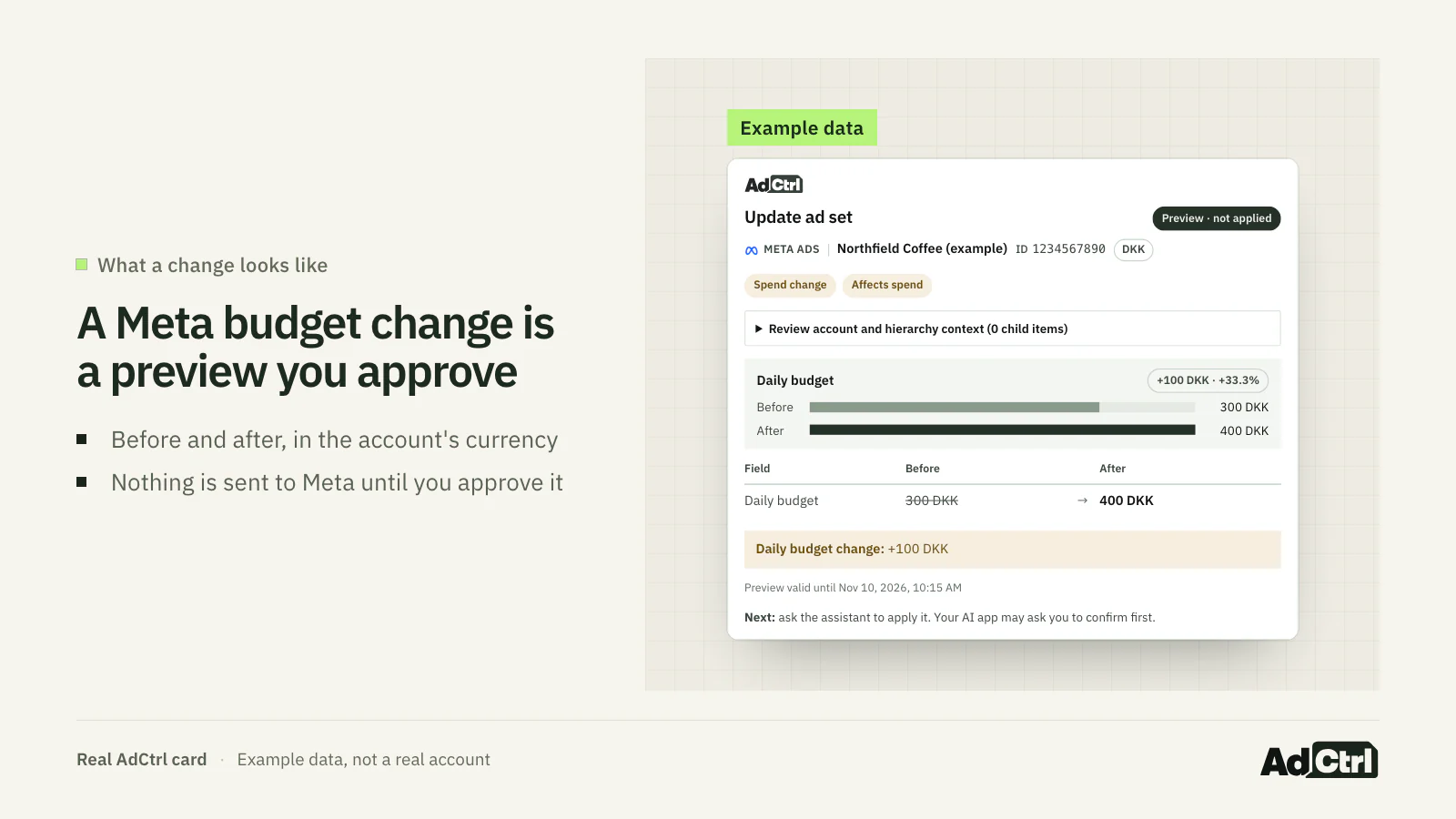
AdCtrl's preview card for a Meta ad set budget change, shown with example data. Nothing is sent to Meta until the change is approved.
Raise the daily budget of the ad set "YOUR AD SET" from 300 to 400 DKK. Show me the preview before you apply anything.Frequently asked questions
Can I make Meta's server read-only?
Set the ad account's rule to all blocked; that denies every agent action on the account, including A/B tests and lift studies, which have no named action. Meta doesn't say whether that reaches pixel tools, so block those in your AI app too. In Claude you can set every write tool to Blocked.
Can I limit Meta's server to one client's ad account?
Not from Claude's connector settings, according to Jon Loomer's August 2026 check: "there's still no way to limit access to ad accounts from this level"9. Set all blocked on the accounts it shouldn't touch, or connect with a login that only has the one account.
Does a budget cap stop a 20% increase?
In the API, yes: edit_budget can trigger on a percentage change, and Meta's own example is denying any budget increase above 20%. In Business Suite the cap is an amount, set under "Budgets set above this amount".
Does it work in Codex or Cursor?
Meta's supported list doesn't name them. Meta says its server works with any MCP-compatible agent, names ChatGPT, Claude and Perplexity plus data, cloud and marketing platforms, and says developers can connect other applications using their own app. Claude Code has a documented command that passes your app ID.
Do Meta's rules apply to other connectors?
Meta describes them as rules "Our ads MCP server will enforce". For any other connector, read that vendor's own approval and scope settings instead of assuming Meta's rules carry over.
Where do I see what the agent changed?
Meta's server has an activity logs category with one tool. Ask the agent for recent activity after any session that wrote something, and compare it with Ads Manager.
What to do next
Meta's server is free, hosted by Meta and can change more than most people expect from a beta. Before you connect it, open Settings > Integrations > Ads MCP server, block edit_status and edit_budget or cap budgets, and decide what to do about pixel rules and tests, which the named rules don't cover, and custom audiences, where Meta's rule wording is unclear5, 4.
Learn more: read Google Ads MCP if you run both platforms, or browse the blog for the rest of the cluster.
Try it: if you'd rather approve a preview of each change, connect AdCtrl with the getting started steps, ask a read-only question first, and look at a preview before you approve anything. Every plan comes with a 3-day free trial.
Sources
- Ad creation and management (tool list); counted with the six other category pages, Meta. Accessed 4 November 2026.
- Meta ads MCP server: connect AI tools, Meta. Accessed 4 November 2026.
- Ads MCP Server (overview), Meta. Accessed 4 November 2026.
- Manage ads from an AI agent with Meta ads AI connectors, Meta. Accessed 4 November 2026.
- Rules best practices (ads MCP server rules API), Meta. Accessed 4 November 2026.
- Meta's ads MCP server is now available for developers, Meta, 16 July 2026. Accessed 4 November 2026.
- Own data: Counted the tool rows in the Markdown versions of Meta's seven ads MCP server category pages to get the number of documented tools. Sample: 7 category pages; 89 rows, 88 distinct tool names. Period: 2026-11-04. Measure: count. Public documentation; no account data.
- Meta Ads MCP Server (Pipeboard guide), Pipeboard. Accessed 4 November 2026.
- Meta Ads AI Connectors Get More Security Controls, Jon Loomer, 11 August 2026. Accessed 4 November 2026.
- Get started (ads MCP server), Meta. Accessed 4 November 2026.
- Pipeboard home (access and permissions), Pipeboard. Accessed 4 November 2026.
- How Windsor MCP Write Actions Work, Windsor.ai. Accessed 4 November 2026.
- How to manage ad campaigns with AI tools, Supermetrics, 27 April 2026. Accessed 4 November 2026.
- Meta Ads — manage from any AI client, Adspirer. Accessed 4 November 2026.
- AdCtrl docs, AdCtrl. Accessed 4 November 2026.
- Introducing Meta Ads AI Connectors, Meta, 29 April 2026. Accessed 4 November 2026.
- Own data: Searched Claude's public connectors directory for 'meta ads', 'meta' and 'facebook' to see whether Meta publishes a listed connector and which third parties are listed. Sample: 1 directory, 3 searches. Period: 2026-11-04. Measure: count. Public directory, not signed in to an account.