Google Ads MCP
Google Ads MCP: what Google's official server does and when a hosted connector fits
The official server's tools, what setup really takes, and how it compares with hosted connectors in Claude and ChatGPT.

By Kaan Catalkaya, Founder of AdCtrl
· 15 min read
Short answer
- Google's docs call the official Google Ads MCP server read-only, but release v0.0.6 (2 November 2026) adds asset and label writes that are on in a fresh install.
- The official server has no tool for budgets, bids, statuses, keywords or new campaigns (checked 4 November 2026).
- Developer tokens were sunset on 9 September 2026; existing token access moved to Google Cloud projects, and a new project starts at Test access.
- Claude takes a custom MCP connector on every plan (Free gets one), and OpenAI lists full custom MCP for ChatGPT Business and Enterprise/Edu only, with Pro limited to read/fetch.
- If someone can deploy to Google Cloud, the official server gives you reporting with no licence fee; budget, bid or keyword changes from Claude or ChatGPT need something beyond it.
Google Ads MCP lets Claude or ChatGPT read a Google Ads account, and sometimes change it, through the Model Context Protocol. Google's official server has no licence fee, you run it yourself and it mostly reports. Since v0.0.6 on 2 November 2026 it also creates assets and labels, and hosted connectors run a server for you1, 2.
I run a performance agency and I build AdCtrl, which is one of those hosted connectors, so the comparison further down lists AdCtrl's limits too. Everything here was checked on 4 November 2026 against Google's docs, the google-ads-mcp repo and Anthropic's and OpenAI's help pages3, 4.
Choose Google's server if
- You or a colleague can deploy a small service to Google Cloud
- You mainly want reports, plus the odd asset or label change
Choose a hosted connector if
- Nobody on the team wants to run a server
- You want budget, bid or keyword changes from the chat
- v0.0.6 release that added asset and label writes, 2 Nov 20262
- 7 tools 3 read, 4 write
- $0 licence fee for Google's server
- 9 Sep 2026 developer tokens sunset
For day-to-day Claude workflows, see Claude for Google Ads. For Meta's equivalent, see Meta Ads MCP.
What is the Google Ads MCP server?
Google's official server is a small open-source program between your AI assistant and the Google Ads API. The assistant asks for data in plain language and gets real numbers back. MCP (Model Context Protocol) is the standard Claude, ChatGPT and other assistants use to call outside tools.
The server queries accounts with GAQL, the Google Ads Query Language. Google publishes the code in its googleads GitHub organisation, and the README says released versions go to PyPI as google-ads-mcp.
People also use "Google Ads MCP" for third-party hosted connectors that talk to Google Ads. This page keeps the two apart. The official server is young, and most of what matters happened this autumn:
- : Google creates the google-ads-mcp repo; version 0.0.1 reaches PyPI on 22 October
- : Developer tokens are sunset for the Google Ads API
- : v0.0.3 removes developer-token validation from the server
- : Google's docs page was last updated and still says read-only
- : v0.0.6 adds asset and label writes, switched on by default2
What can Google's official server do?
Google's server has three read tools and four write tools, and the writes cover assets and labels only.
| Tool | What it does | Type |
|---|---|---|
list_accessible_customers | Lists the account IDs and names your login can reach | Read |
search | Runs GAQL queries for metrics, budgets and status | Read |
get_resource_metadata | Describes Google Ads resources and fields | Read |
create_asset | Creates text, image, YouTube video, sitelink, callout and other assets | Write |
upload_video_asset | Uploads a local video to YouTube for video assets (local mode only) | Write |
manage_labels | Creates, updates and removes account labels | Write |
manage_label_associations | Puts labels on campaigns, ad groups and criteria, or removes them | Write |
The official server reads anything GAQL can return and writes only assets and labels.
Source: Google Ads MCP docs page (last updated 30 October 2026) and the googleads/google-ads-mcp README at v0.0.63, 1
Every write uses what Google calls Propose & Confirm. In plain terms, the server first does a dry run and shows what would change. It only makes the change when a second call repeats the exact request with a checksum, a short code from the dry run, after you say yes. A missing or mismatched checksum is rejected before anything is touched.
Google's server has no tool for budgets, bids, statuses or keywords, and none for creating campaigns. Google's docs put it this way: "This implementation is strictly read-only. It cannot modify bids, pause campaigns, or create new assets." The last part is already out of date, because v0.0.6 creates assets3, 2.
The current release is v0.0.6. To me that version number says early software, so I'd expect tools and defaults to change between releases and would pin the version I tested. The README shows how to run one exact published version with pipx.
What does using the official server look like?
Using Google's official server means asking questions in normal language while the assistant picks the tool. These two only read:
List the Google Ads accounts you can access.That one calls list_accessible_customers and returns the customer IDs and account names your login reaches.
Show clicks, cost, conversions and status for each campaign in account 123-456-7890 over the last 30 days.That one runs a GAQL query through search, which returns metrics plus budget and status fields. The assistant then writes the summary from those rows, so check its maths against the numbers it shows you.
A write looks different. Ask it to create a label called "Q4 test" and put it on one campaign, and that becomes two proposals in a row: first manage_labels creates the label, then manage_label_associations attaches it, since the attachment refers to the new label.
Each proposal first comes back as a dry run with a list of the changes and a checksum. The assistant shows you that list, and only after you approve does it send the same request again with the checksum1.
Is the official server read-only?
A fresh install of Google's server can write; only the docs page still says read-only. The two Google sources disagree:
Google's docs page says
The mode is "Read-only (current release)", and the implementation "cannot modify bids, pause campaigns, or create new assets" (page last updated 30 October 2026)3.
Google's code says
Release v0.0.6 on 2 November 2026 adds four write tools for assets and labels, and the bundled config switches them on by default2.
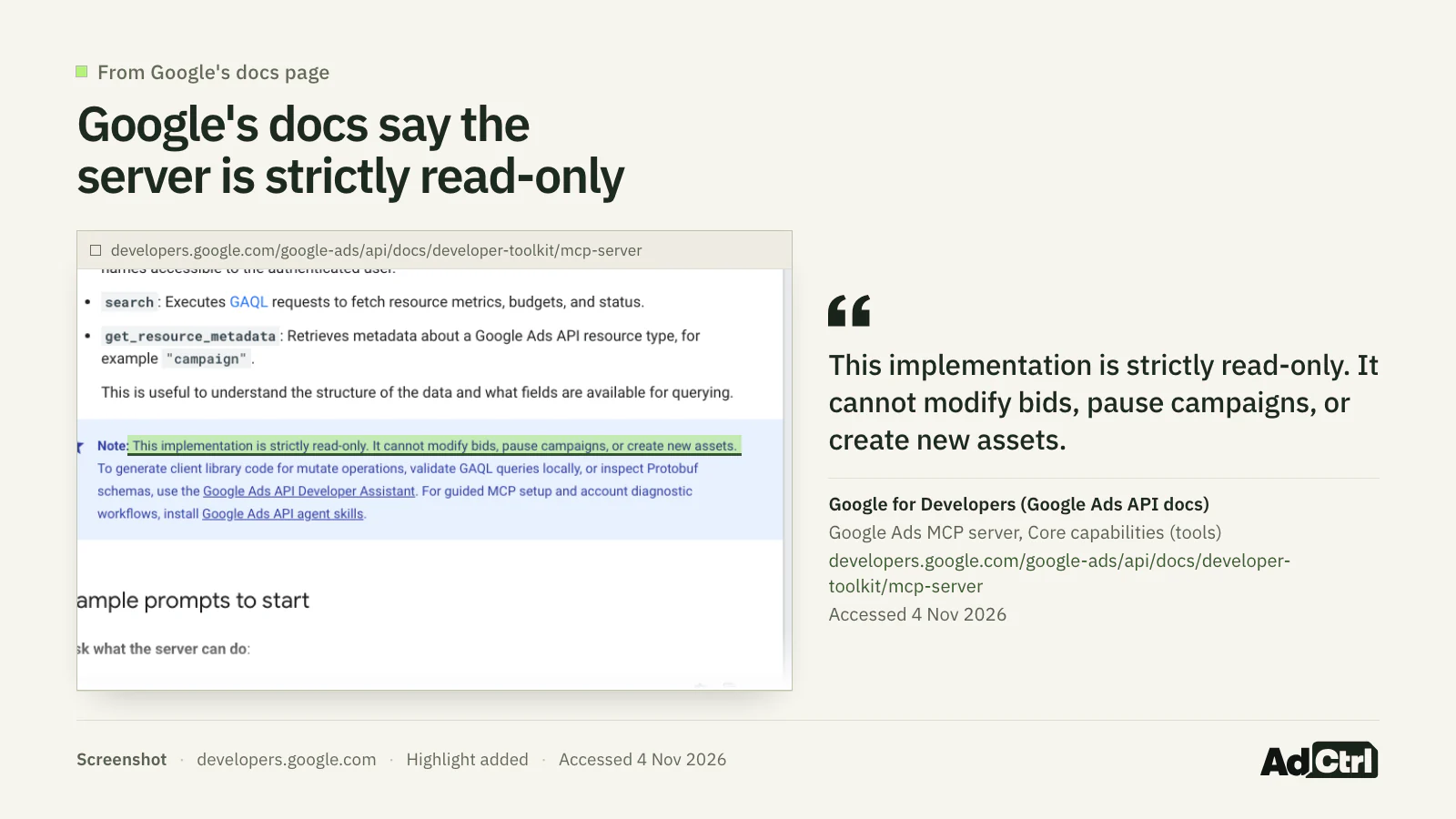
Screenshot of Google's docs page, 4 November 2026: the note still says the implementation "is strictly read-only" and "cannot … create new assets", two days after the write tools shipped.
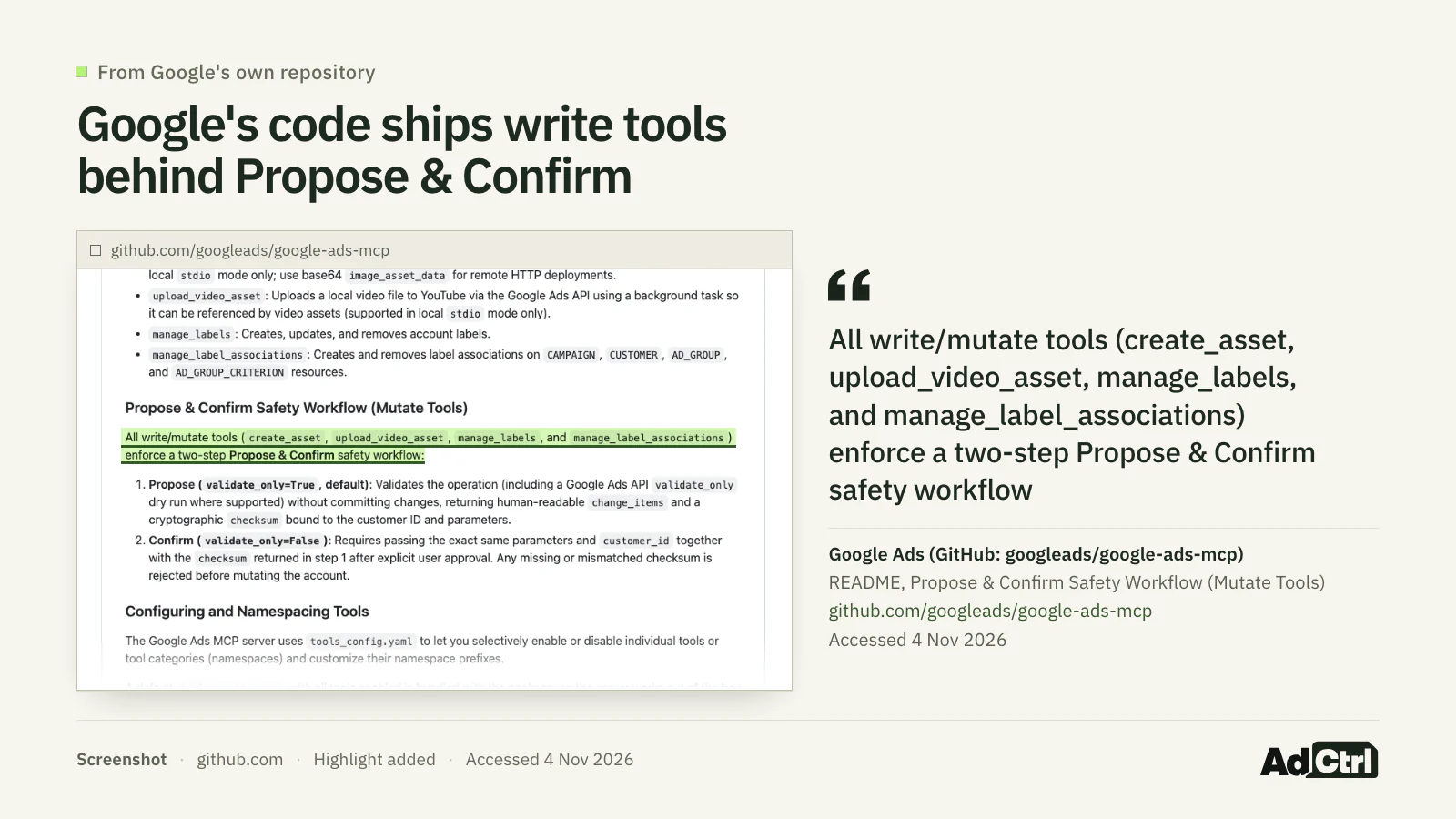
Screenshot of the google-ads-mcp README on GitHub, 4 November 2026: four write tools behind Propose & Confirm, and the advice to set two options to false for a read-only deployment.
To keep a deployment read-only, put these two lines in your tools_config.yaml, as the README says:
labels: falseassets: false
I read it as a reporting server that is slowly growing write tools, with a checksum on every change. If I were setting it up on a client account, I'd ship it read-only first and turn writes on later, once I trusted how the assistant behaves.
Do you still need a developer token?
You can ignore developer tokens now: Google sunset them on 9 September 2026, and the latest server no longer asks for one3, 5. A developer token was a key sent with every Google Ads API call, and the README's leftover "Configure Developer Token (Optional)" step can be skipped1.
Check your Google Cloud project's access level instead. Existing token access was transferred to Cloud projects. A new project starts at Test access, which covers test accounts only, and a Test-access project gets an error when it calls a live (production) account. To use the server on real accounts, apply for Explorer access or higher; the FAQ below has the steps.
How hard is the official setup?
Google's official setup is a developer task: you need someone who can create a Google Cloud project, install a Python package and, for claude.ai or ChatGPT, deploy a web service.
If that isn't you, ask whoever looks after your website hosting or Google Cloud. Google publishes no setup time, and there's no licence fee. Cloud Run usage beyond Google's monthly free tier is billed to your own Google Cloud billing account6.
A few terms you'll meet:
- OAuth client: the app identity (a client ID and secret) you create in Google Cloud so people can sign in with Google and grant access.
- stdio vs Streamable HTTP: with stdio your AI app starts the server as a program on your own computer; with Streamable HTTP it runs as a web service with a URL.
- Cloud Run: Google Cloud's service for running a program like this at a public web address.
The steps, in order:
Pick a Google Cloud project and create OAuth credentials or a service account.
Install
google-ads-mcpfrom PyPI or GitHub; v0.0.6 was the latest release when checked.Decide on writes: keep the default, or set the two
falselines above.Run it locally over stdio, or deploy it to Cloud Run so it answers at
/mcp.
Google's docs also point to Google Ads API agent skills and the Developer Assistant, a plugin for Google Antigravity and Claude Code that writes client library code.
How do you connect it to Claude or ChatGPT?
Claude Desktop can run Google's server locally through its config file. claude.ai and ChatGPT connect from their own cloud, so they need a remote URL added as a custom connector, and the local setup doesn't carry over to them.
For Claude Desktop, Google's docs give a ready-made mcpServers entry in the configuration section. It starts the server with pipx run --spec git+https://github.com/googleads/google-ads-mcp.git google-ads-mcp and points GOOGLE_APPLICATION_CREDENTIALS at your credentials file. In Claude Desktop that entry goes in claude_desktop_config.json.
For a Cloud Run deployment, Google's docs list four requirements:
- URL: your Cloud Run address with
/mcpat the end, such ashttps://your-cloud-run-url.a.run.app/mcp. - Sign-in: OAuth 2.0 with your own OAuth client ID and secret.
- Redirect URIs: add
https://claude.ai/api/mcp/auth_callbackandhttps://chatgpt.com/connector_platform_oauth_redirectto the OAuth client. - Access: deploy with
--allow-unauthenticatedplus application-level OAuth, because Claude and ChatGPT sign users in with OAuth, not Cloud IAM tokens.
Which plans can add a remote MCP server, per Anthropic's and OpenAI's help pages:
| App | Plan | Remote MCP server |
|---|---|---|
| Claude | Free | One custom connector |
| Claude | Pro, Max, Ultra | Yes |
| Claude | Team, Enterprise | Yes; owners (and on Enterprise, a custom role) add them |
| ChatGPT | Business, Enterprise/Edu | Full MCP, including writes; web only |
| ChatGPT | Pro | Read/fetch only |
| ChatGPT | Plus, Free | Not stated by OpenAI |
Claude allows a custom connector on every plan; ChatGPT's full custom MCP support is limited to Business and Enterprise/Edu.
Source: Anthropic's custom connector help article and OpenAI's help article on custom MCP servers, read 4 November 20264, 7
In Claude, Pro and Max users go to Customize > Connectors, click "+ Add", then "Add custom connector"; the server must be reachable from Anthropic's IP ranges, and Anthropic does not verify custom connectors4.
In ChatGPT's current Plugins experience you select the plus button and then "Add custom MCP server", without turning on Developer Mode first. OpenAI's article doesn't mention Plus or Free, so I won't guess about them.
A hosted connector skips the Cloud Run part. AdCtrl goes into Claude as a custom connector at https://app.adctrl.ai/mcp, and in ChatGPT, adding it by address works on plans that allow custom MCP servers, which OpenAI lists as Business and Enterprise/Edu. The getting started steps have the current menus.
Is there a Google Ads MCP server URL?
Google offers no public hosted URL for its server; the docs mention a hosted endpoint pilot for allowlisted participants only, with no public sign-up. For everyone else the URL is the one you deploy, such as your Cloud Run address ending in /mcp.
On 4 November 2026 I searched Claude's connectors directory and the Plugins directory in ChatGPT for "google ads" and found no Google-published app in either. Claude's directory listed three third-party connectors: Windsor.ai, Supermetrics Marketing Analytics and Adspirer Search Ads. Listings change, so check again before you rely on that8, 9.
Who is each option for?
Google's official option mostly reads, with asset and label writes, and fits a team with someone technical. Several hosted connectors now change campaigns too; they differ in how a change gets approved and what you see before it goes through.
Google's server: No licence fee, you run it; reads with GAQL and writes only assets and labels
(Self-hosted)
Windsor.ai: Says it can "create, pause, and optimize campaigns, budgets, and bids"
(Hosted)
Supermetrics: Shows each proposed change before it goes live; you choose when approval is needed
(Hosted)
Adspirer Search Ads: Says it "plans, launches, and autonomously runs" search campaigns
(Hosted)
AdCtrl: Before-and-after preview with the spend effect, then a readback of what Google saved
(Hosted)



All three of the others are listed in Claude's directory, and Windsor.ai lists 320 more sources and Supermetrics 200+. I'm not going to rank them. Read each vendor's approval step closely, because that decides what happens when the assistant gets something wrong.
| Option | What it changes | Before a change goes through | Cost and limits |
|---|---|---|---|
| Google's server (you host) | Assets and labels | Dry run, then your approval with a checksum | No licence fee; Cloud Run past the free tier is billed to you; no budgets, bids, statuses or keywords |
| Windsor.ai | Campaigns, budgets, bids and keywords (34 Google Ads actions) | New campaigns paused; most pause, enable and update actions can be undone; approval flow not checked | Writes run through the free Windsor MCP server; plan pricing not checked |
| Supermetrics | Creates and updates campaigns (early access) | Change shown before it goes live; you choose when approval is needed, from none to all live changes | Early access, included in an existing Supermetrics subscription; subscription price not checked |
| Adspirer Search Ads | "Plans, launches, and autonomously runs" search campaigns | Not checked | Not checked |
| AdCtrl | Budgets, bids, keywords and campaigns | Before and after with spend effect, your approval in Claude or ChatGPT (per your app's permission setting), a check that nothing changed, then a readback | $19 or $39 a month, or $99 per user on Agency (excl. VAT); can't publish Tag Manager versions; no unified attribution model (each platform reports its own conversions); AI plan billed separately |
As of 4 November 2026, Google's server mostly reads while several hosted connectors make changes; they differ in what you see and approve before a change goes through.
Source: Google docs and repo, Cloud Run pricing, Claude's directory, Windsor.ai and Supermetrics docs, AdCtrl docs and pricing3, 1, 10, 8, 6, 11, 12
If you only need reporting and someone on your team is happy in Google Cloud, I'd run the official server. No third-party vendor sits between you and Google, and you own the OAuth client.
If you change budgets, bids or search terms every week, the official tool list won't cover it, and you'll be picking between hosted connectors on how they approve changes. Our audit checklist shows which reads matter before you change anything.
What does a change look like through AdCtrl?
AdCtrl, a hosted connector, puts every change through a preview first: it reads the current settings, shows the before and after with any effect on spend, and applies only what you approved10.
You ask for a change in Claude or ChatGPT. AdCtrl reads the current settings and prepares a preview with the account, the before and after, and any effect on spend. You approve it in your AI app. AdCtrl checks that nothing changed since the preview, sends exactly what you approved to Google, and reads the account back to report what Google saved.
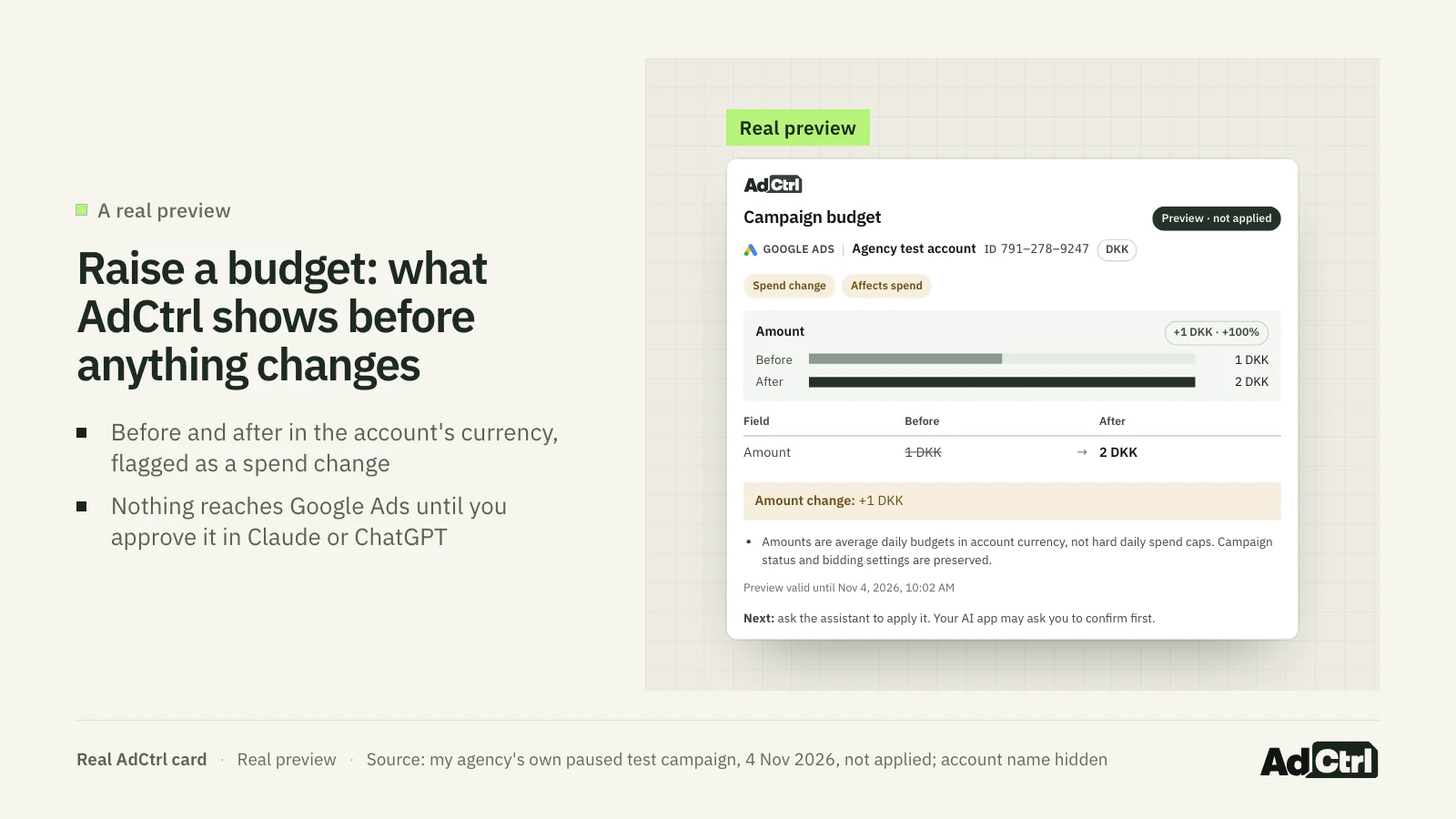
A real AdCtrl preview from my agency's own paused test campaign, captured on 4 November 2026: the average daily budget goes from 1 DKK to 2 DKK, flagged as a spend change. Nothing went to Google because nobody approved it, and the preview expired unused.
Raise the daily budget of the campaign "YOUR CAMPAIGN" from 1 to 2 DKK. Show me the preview before you apply anything.Whether Claude or ChatGPT asks you before applying depends on the approval settings in your AI app, which you choose (approval settings). The how changes work section covers the rest, including what happens when Google doesn't confirm a change.
Frequently asked questions
How do I test Google Ads MCP safely on a real account?
With Google's server, start with labels: false and assets: false so it can only read. With a hosted connector, check whether it has a read-only switch per account and turn it on first. Either way, ask a read-only question first and compare the answer with the Google Ads interface.
What can the official server's asset and label writes change?
create_asset creates text, image, YouTube video, sitelink, callout, structured snippet and other assets. manage_labels creates, updates or removes labels, and manage_label_associations puts them on or takes them off campaigns, ad groups, ad group criteria and the customer. Labels are handy for tagging what you want to report on; none of these tools touch budgets, bids or statuses.
How do manager (MCC) accounts work?
With Google's server you pass the manager's ID as login_customer_id on each call, or set GOOGLE_ADS_LOGIN_CUSTOMER_ID once as the default. list_accessible_customers returns the customer IDs your login can access directly, such as the manager account itself; client accounts under it are reached by passing that manager ID as login_customer_id.
Can I change budgets from Claude without a hosted connector?
Not through Google's server, which has no budget tool. Google's Developer Assistant, a plugin for Claude Code and Antigravity, generates client library code, including mutate scripts, which a developer can run. Several hosted connectors can: Windsor.ai and Supermetrics describe campaign and budget changes in their own docs, and AdCtrl changes budgets and bids after you approve a preview.
How does a new Cloud project get past Test access?
Test access covers test accounts only. Apply for Explorer access on the Google Ads API Overview page in Cloud Console; Google says review is automated and approved in most cases, for up to 2,880 operations a day on production accounts. Basic and Standard access need brand verification of your Cloud project first5. Google's MCP docs ask for Explorer, Basic or Standard access before you use the server.
Who sees my Google Ads data?
Any MCP server passes the data you ask for to the AI app you connect. Anthropic does not verify custom connectors, so you are trusting whoever runs the server. With Google's server that is you; with a hosted connector it is the vendor, so read its scopes and data handling before you connect it.
What to do next
Google's server is a good way to get GAQL reporting into Claude or ChatGPT with no licence fee, if someone can host it. Its only writes are assets and labels. For budgets, bids or keywords from Claude or ChatGPT you need something beyond the official server, such as a hosted connector with a preview and approval step1, 10.
Learn more: read Claude for Google Ads for day-to-day workflows, or Meta Ads MCP if you run both platforms.
Try it: connect AdCtrl with the getting started steps, ask a read-only question first, and look at a preview before you approve anything. Every plan comes with a 3-day free trial, no card needed.
Sources
- googleads/google-ads-mcp: README and tools_config.yaml (v0.0.6), Google, 2 November 2026. Accessed 4 November 2026.
- Implement asset and label management with propose-and-confirm flow (PR #139) and release v0.0.6, Google, 2 November 2026. Accessed 4 November 2026.
- Google Ads MCP server: Developer integration guide, Google, 30 October 2026. Accessed 4 November 2026.
- Get started with custom connectors using remote MCP, Anthropic. Accessed 4 November 2026.
- API access management and developer token sunset, Google, 9 September 2026. Accessed 4 November 2026.
- Cloud Run pricing, Google, 4 November 2026. Accessed 4 November 2026.
- Connecting custom MCP servers in ChatGPT, OpenAI, 28 October 2026. Accessed 4 November 2026.
- Claude connectors directory search, 'google ads' (own check), Anthropic, 4 November 2026. Accessed 4 November 2026.
- Own data: Searched Claude's public connectors directory and ChatGPT's Plugins directory for 'google ads' and 'adctrl' to see whether Google publishes a first-party Google Ads app and whether AdCtrl is listed.. Sample: 2 directories, 4 searches. Period: 2026-11-04. Measure: count. No account data; ChatGPT viewed in the owner's signed-in session, so personal/workspace listings may appear.
- AdCtrl docs: connect Google Ads and Meta Ads to Claude or ChatGPT, AdCtrl, 3 November 2026. Accessed 4 November 2026.
- How to manage ad campaigns with AI tools, Supermetrics, 30 October 2026. Accessed 4 November 2026.
- How Windsor MCP Write Actions Work, Windsor.ai, 4 November 2026. Accessed 4 November 2026.
- google-ads-mcp release history (GitHub releases, repository metadata, PyPI), Google (GitHub) / PyPI, 10 September 2026. Accessed 4 November 2026.
- Own data: A real AdCtrl budget preview, requested through the AdCtrl connector, raising the average daily budget of my agency's own paused test campaign from 1 DKK to 2 DKK; not applied. Sample: one preview on one paused test campaign in my agency's own Google Ads account. Period: 2026-11-04. Measure: single capture; tool output saved in artifacts/evidence-budget-preview-2026-11-04.json. My agency's own account; no client data.