Google Ads Audit
Google Ads audit checklist (2026): 40 checks, each with the data that proves it
What to check first, the screen and API field behind every check, what changed in 2025 and 2026, and which calls an AI can make for you.

By Kaan Catalkaya, Founder of AdCtrl
· 27 min read
Short answer
- Start a Google Ads audit with conversion measurement. If bidding chases the wrong action, the other 39 checks are judged against the wrong number.
- New Search campaigns have AI Max on by default, and Search campaigns with automatically created assets or campaign-level broad match are auto-upgraded from September 2026.
- Performance Max now has search terms, campaign-level negative keyword lists and a channel performance report, so it no longer gets skipped as a black box.
- Google's AI Max FAQ still says AI Max is not in the API, while the v26 API reference documents campaign.ai_max_setting.enable_ai_max.
- In this checklist an AI can settle 7 checks from the data alone and prepare 23 more; 10 need a human to judge intent, brand and fit.
Run this Google Ads audit in Claude or ChatGPT with AdCtrl
Start free3-day free trial · no card needed
A Google Ads audit in 2026 is 40 yes-or-no checks in ten areas, run by money at risk: conversion measurement first, then the settings that route spend, then the defaults Google changed in 2025 and 20261. Each check below names the screen to open, the API field that proves it where one exists, and who has to make the call.
I run a performance agency and I build AdCtrl, which connects Google Ads to Claude or ChatGPT, so where AdCtrl can do a read I give the exact words to type. Tracking gaps have their own article, GA4 conversions don't match Google Ads. Checked 5 November 2026 against Google's help pages and the v26 API reference2.
What does a Google Ads audit check in 2026?
A Google Ads audit checks three things: that the account measures the outcome the business is paid for, that spend goes where the business sells, and that Google's automation is switched on deliberately. The 40 checks below cover that in ten areas, from conversion goals to change history, and every check ends in a yes or a no.
This covers Search, Performance Max and Demand Gen. It leaves out Shopping feeds and Merchant Center, Video, App and Local campaigns.
- 40 checks in ten areas
- v26.1 latest Google Ads API, 28 Oct 2026
- 2 years of change history in the interface3
- 30 days of change history through the API
Each check carries one of three marks:
- AI can verify: the answer is in the data. A setting is on or off, a column has a value.
- Human judges: the data can't answer it, because the answer turns on what you sell and at what margin.
- Both: an AI or a script pulls the numbers and flags what looks off, and you make the call.
Across the 40, that comes to 7 an AI can settle from the data alone, 23 Both and 10 Human judges.
What changed in Google Ads in 2025 and 2026?
Google changed several defaults that older checklists never mention. AI Max is now on by default for new Search campaigns, Performance Max gained search terms and a channel report, and Display campaigns are moving into Demand Gen4, 5. Every line in the timeline turns into a check further down; "check now" marks what is already live in accounts, "plan for" what is still coming.
- : Google announces AI Max for Search campaigns, rolling out in beta
- : Check now: Performance Max gets search terms reporting in all campaigns and campaign-level negative keyword lists
- : Check now: channel performance report in all Performance Max campaigns
- : Google Ads API v23 adds an ad network breakdown for Performance Max
- : AI Max leaves beta; Google announces the Dynamic Search Ads upgrade
- : Check now: offline conversion imports move to the Data Manager API (15 June); enhanced conversions become one switch; the Display to Demand Gen migration tool starts rolling out
- : Check now: Search campaigns with automatically created assets or campaign-level broad match start auto-upgrading to AI Max1
- : Plan for: the Dynamic Search Ads auto-upgrade begins; Search campaigns with Display Expansion move to channel prioritization
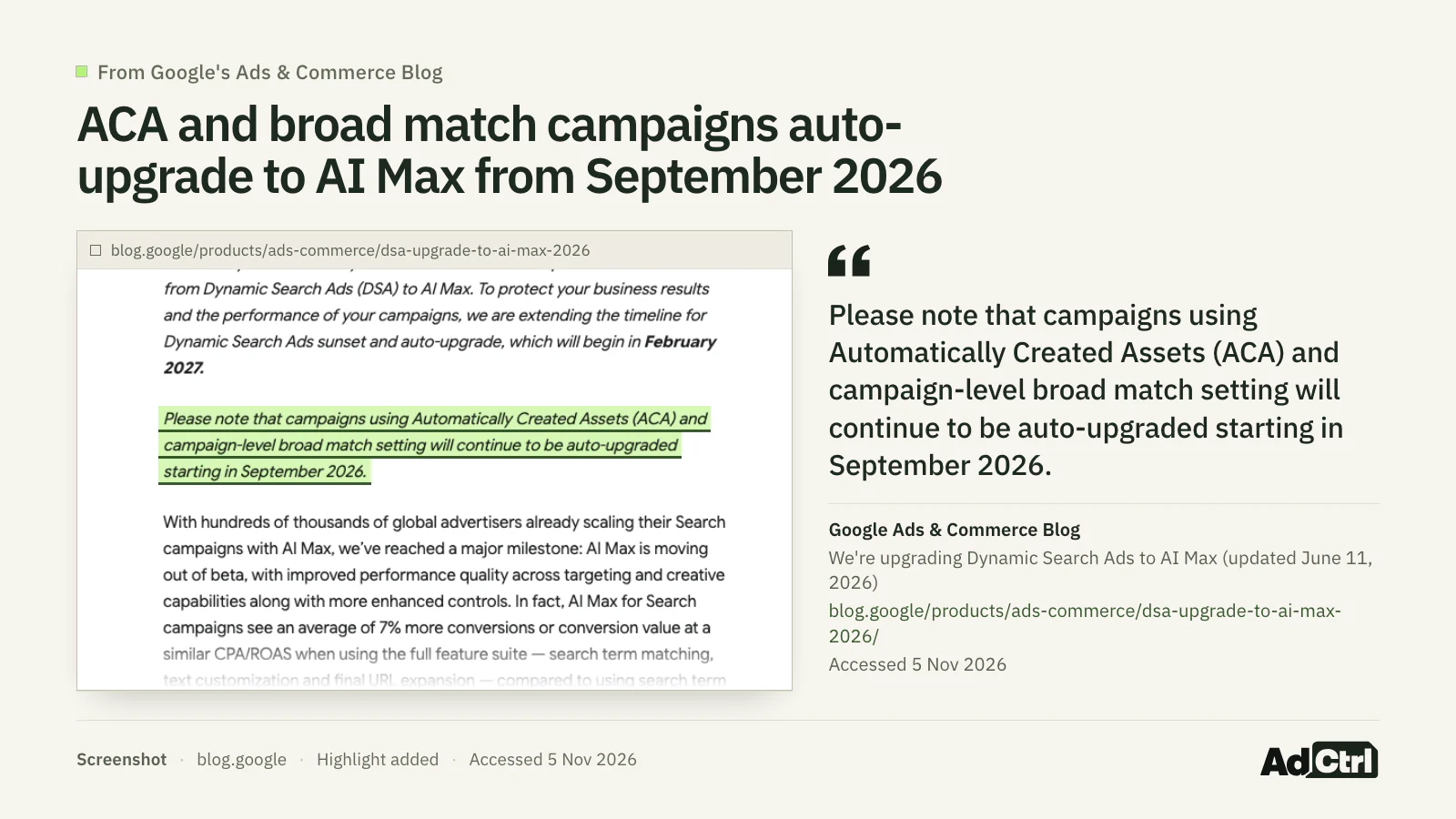
Screenshot of Google's Ads and Commerce blog, updated 11 June 2026: the Dynamic Search Ads upgrade moved to February 2027, but campaigns with automatically created assets or campaign-level broad match "will continue to be auto-upgraded starting in September 2026".
Google names only two kinds of Search campaign for the September upgrade: those with automatically created assets and those with the campaign-level broad match setting. Whether yours were upgraded is a date you can read per campaign (check 16), so don't assume either way.
Which checks should you run first?
Run the checks in order of the money a wrong answer puts at risk, and put measurement first, because every other number in the account is judged against it. The order is my agency's method, not Google's.
Which checks first, our method: measurement, then the settings that route spend, then the AI Max, Performance Max and Demand Gen defaults, then search terms and keywords, then ads and landing pages, then access and change history. The order follows how much spend a wrong answer puts at risk.
Short on time? Fix these ten first, in this order. They cover measurement and the settings that move the most money.
- Check 1: only real business outcomes are primary conversions.
- Check 2: the goals each campaign bids toward match the business goal.
- Check 3: counting fits each action.
- Check 7: offline and lead uploads are healthy.
- Check 8: each bid strategy has enough conversions and isn't limited.
- Check 10: impression share lost to budget and to rank were read.
- Check 12: Search partners and Display earn their spend.
- Check 13: the location option fits the business.
- Check 16: you know which campaigns run AI Max and which were auto-upgraded.
- Check 27: search terms that spend without converting were reviewed.
Set the full audit up in four steps before you open a single report:
Write the business goal in one line: the action that makes money, and a target cost per lead or return on ad spend.
Manual: agree it with whoever owns the numbers; the measurement and target checks are judged against it.
With AdCtrl: write "List my conversion actions with their settings, so I can say which one is the real goal."
Pick a date range of complete weeks, long enough to hold conversions you can judge.
Manual: set the same range on every report you open during the audit.
With AdCtrl: write "Use the last eight complete weeks for everything in this review."
List your brand terms, so brand and non-brand searches can be split later.
Manual: include misspellings and product names that only you sell.
With AdCtrl: write "Split last month's search terms into searches that contain our brand name and searches that don't."
Work down the checks in order and mark each one yes or no.
Manual: use the printable checklist at the end of this article.
With AdCtrl: paste the audit prompt from the AI section and tick the list off as answers come back.
Is conversion tracking measuring the right thing? (checks 1–7)
Conversion tracking is right when the actions marked primary are the outcomes the business gets paid for, each counted once. Get it wrong and the bid strategy optimizes toward the wrong thing, which is why I fix it before touching anything else.
| # | Check | Where in Google Ads | Who decides |
|---|---|---|---|
| 1 | Only real business outcomes are primary conversions | Goals → Summary | Both |
| 2 | The goals each campaign bids toward (account default or campaign-specific) match the business goal | Goals → Summary; campaign Settings → Goals | Human judges |
| 3 | Counting fits the action, such as one per click for leads | Conversion action → Count | Both |
| 4 | Values are set, and not one flat default where real value varies | Conversion action → Value | Human judges |
| 5 | Enhanced conversions are on (one switch from June 2026) | Goals → Settings → Customer data use | AI can verify |
| 6 | Consent mode is in place for EEA and UK traffic | Your consent banner and Tag Assistant; no Ads API field found | Human judges |
| 7 | Offline and lead uploads are healthy, and API uploads go through the Data Manager API | Goals → Uploads; upload diagnostics | Both |
Measurement checks come first because bidding and every later check use these numbers.
Source: Google Ads Help on conversion goals, counting options, enhanced conversions, offline imports and consent mode6, 7, 8, 9, 10
Check 7 matters if a script, CRM or tool uploads conversions. Google says that from 15 June 2026, offline conversion imports and enhanced conversions for leads uploads "will be migrated to the Data Manager API and blocked in the Google Ads API"8. Consent mode is a check you do on the site: it passes consent status to Google, but it "doesn't provide a consent banner or widget"10.
If a check fails, make the real outcome the one primary action for that sale or lead and set the rest to secondary, then give bidding time to adjust before you judge anything downstream.
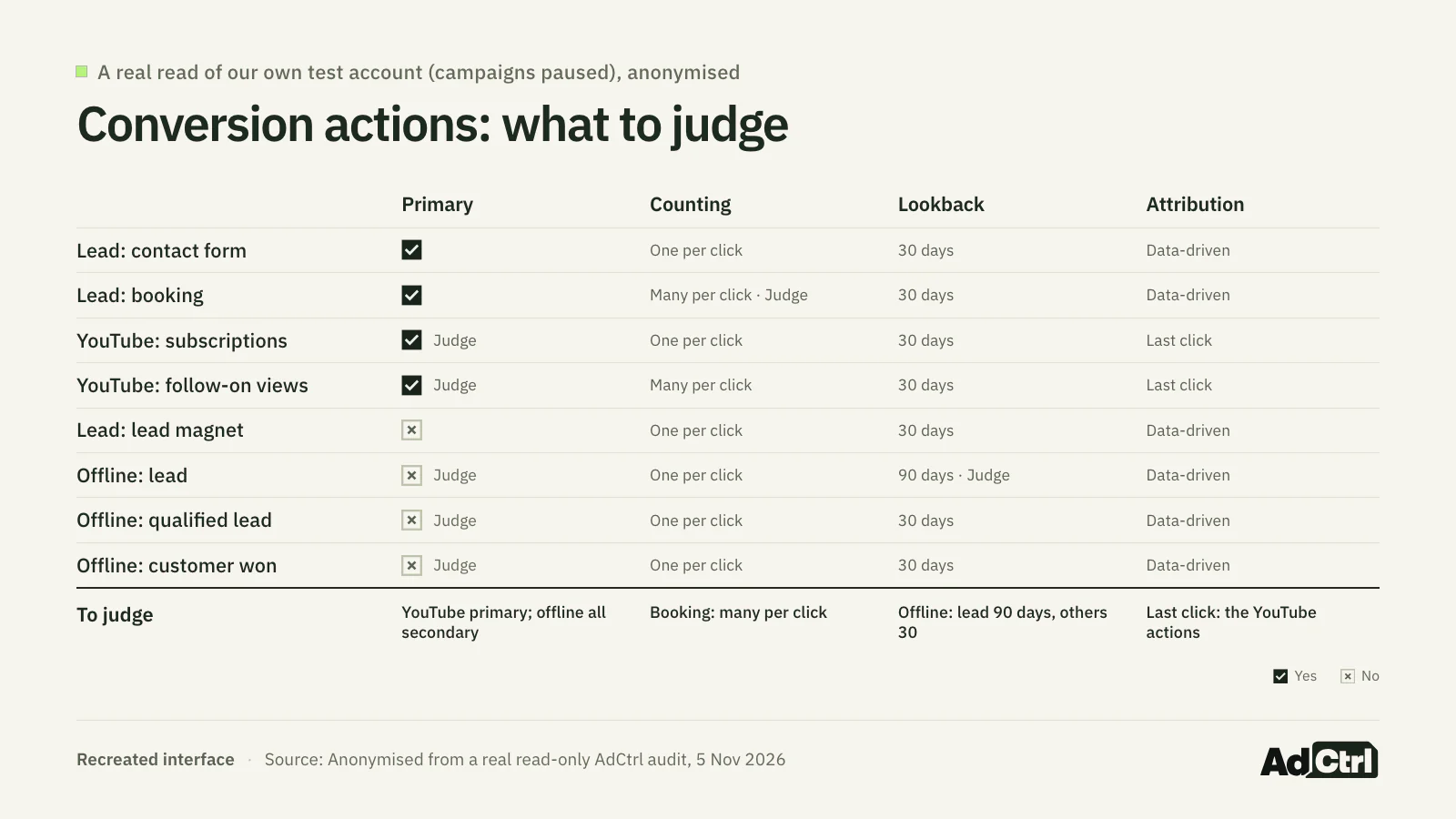
Our own test account, all campaigns paused, read through AdCtrl with read-only requests on 5 November 2026 and anonymised; not a client account. Two YouTube engagement actions are primary next to the leads, one lead action counts many per click, one offline stage looks back 90 days where the others use 30, and every offline stage is secondary.
- Manual: open Goals → Summary, then each conversion action's settings; for check 5, Goals → Settings → Customer data use; for check 7, the upload diagnostics.
- In AdCtrl, write: "List my conversion actions with their settings and the offline upload diagnostics. Flag any that count the same lead or sale twice."
Lead uploads have their own walkthrough in Google Ads offline conversions.
Are bidding, budgets and campaign settings sending spend to the right place? (checks 8–15)
Bidding, budget, network and location settings decide where the money goes. The bid strategy needs enough conversions to work with, the budget should be the real limit rather than ad rank, and networks and locations should match where the business sells.
| # | Check | Where in Google Ads | Who decides |
|---|---|---|---|
| 8 | Bid strategy fits conversion volume and isn't stuck in learning or limited | Campaigns → Bid strategy type and status | Both |
| 9 | CPA and ROAS targets are realistic against actual results | Campaigns → Target CPA / Target ROAS next to Cost / conv. | Human judges |
| 10 | Impression share lost to budget is read next to share lost to rank before any budget goes up | Campaigns → Search lost IS (budget) and (rank) | Both |
| 11 | Shared budgets and budget channel settings are known | Shared library → Budgets; budget settings | AI can verify |
| 12 | Search partners and Display on Search campaigns earn their spend | Campaign Settings → Networks; segment by Network | Both |
| 13 | The location option (presence, or presence or interest) fits the business | Campaign Settings → Locations → Location options | Both |
| 14 | Targeted and excluded locations match where you sell | Campaign Settings → Locations | Both |
| 15 | No campaign is quietly limited | Campaigns → Status column | AI can verify |
Settings that decide where the money goes. Most you can read off the account; whether they fit the business is the judgement.
Source: Google Ads API v26 campaign and campaign_budget references; Google Ads Help on location options and channel prioritization11, 12, 13
Two findings from audits we've run. Campaigns on the default location option paid for clicks from people who only showed interest in the area, in one account mostly from outside the market it served. And Search campaigns served on Search partners and the Display Network, with spend and no conversions there.
Neither setting is a mistake by default. Google's default location targeting "includes both physical locations and locations of interest"12, and from February 2027 Search campaigns with Display Expansion move to channel prioritization11. If a check fails, segment by network and by location first, and switch off only what the segment shows isn't converting.
If a campaign loses more impression share to rank than to budget, a bigger budget won't buy those impressions back. Fix ads, keywords or bids first.
- Manual: add Bid strategy type, Search impr. share and both lost IS columns to the Campaigns view; open each campaign's Settings for networks and locations.
- In AdCtrl, write: "For each campaign, show the bidding strategy and its status, the target, search impression share and the share lost to budget and to rank, the networks it serves on, its location option, and its targeted and excluded locations."
- In AdCtrl, write: "List my budgets with the daily amount and which campaigns share each one."
- With AdCtrl: it reads campaign settings, impression share and bidding status directly from Google Ads, so the two requests above bring back the data for most of these checks. Whether the settings fit the business stays your call.
Which campaigns run AI Max, and should they? (checks 16–20)
AI Max is a Search campaign setting that adds search term matching, text customization and final URL expansion, and new Search campaigns have it on by default. The audit question is which campaigns run it, whether Google switched it on for you, and whether the pages and ads can take it.
| # | Check | Where in Google Ads | Who decides |
|---|---|---|---|
| 16 | Which Search campaigns run AI Max, and which were auto-upgraded | Campaigns → AI Max columns; Settings → AI Max | AI can verify |
| 17 | AI Max runs on conversion-based Smart Bidding and isn't limited by budget | Settings → Bidding; Status | AI can verify |
| 18 | Final URL expansion and text customization are on only where pages and copy can take it; pinning is reconsidered | Settings → AI Max → asset optimization | Human judges |
| 19 | URL exclusions and brand inclusions or exclusions are set | Settings → AI Max → URL exclusions, Brands | Both |
| 20 | AI Max search terms, headlines and landing pages are read together | Search terms (match type "AI Max", Source column); Landing pages ("Selected by") | Both |
AI Max changes which searches, headlines and pages a Search campaign uses; these checks find out where it is on and what it does.
Source: Google Ads Help, How AI Max works and Set up AI Max; Google Ads API v26 campaign reference14, 4, 13
Three rules from Google's own pages decide checks 17 and 1814, 4. AI Max "won't be effective if campaigns are limited by budget". Its features need "conversion-based Smart Bidding strategies in order to function effectively". With final URL expansion on, "pinning of RSA assets will not be respected", so a pinned legal line can stop showing where you expect it.
If pinning matters more than the extra reach, Google lets you switch text customization and final URL expansion off one by one. My reading of the three rules, per campaign:
Keep AI Max on if
- The campaign bids with a conversion-based Smart Bidding strategy
- It isn't limited by budget
- Your landing pages and ad copy can take generated text and expanded URLs
Switch features off if
- A pinned headline or legal line must always show (final URL expansion ignores pinning)
- The pages Google could pick don't match what the ad promises
Fix first, then judge, if
- The campaign is limited by budget, or bids with manual CPC
- AI Max can't show what it does until that changes
Google's documentation also contradicts itself on API support, which matters if you audit with a script or an AI:
Google's AI Max FAQ says
AI Max "is not yet available in the API and Editor", and "Support for Editor and API is expected later in 2025"15.
The v26 API reference says
campaign.ai_max_setting.enable_ai_max "Controls whether or not AI Max features are served for this campaign", and campaign.aca_migration_date_time and campaign.broad_match_migration_date_time record an auto-upgrade13.
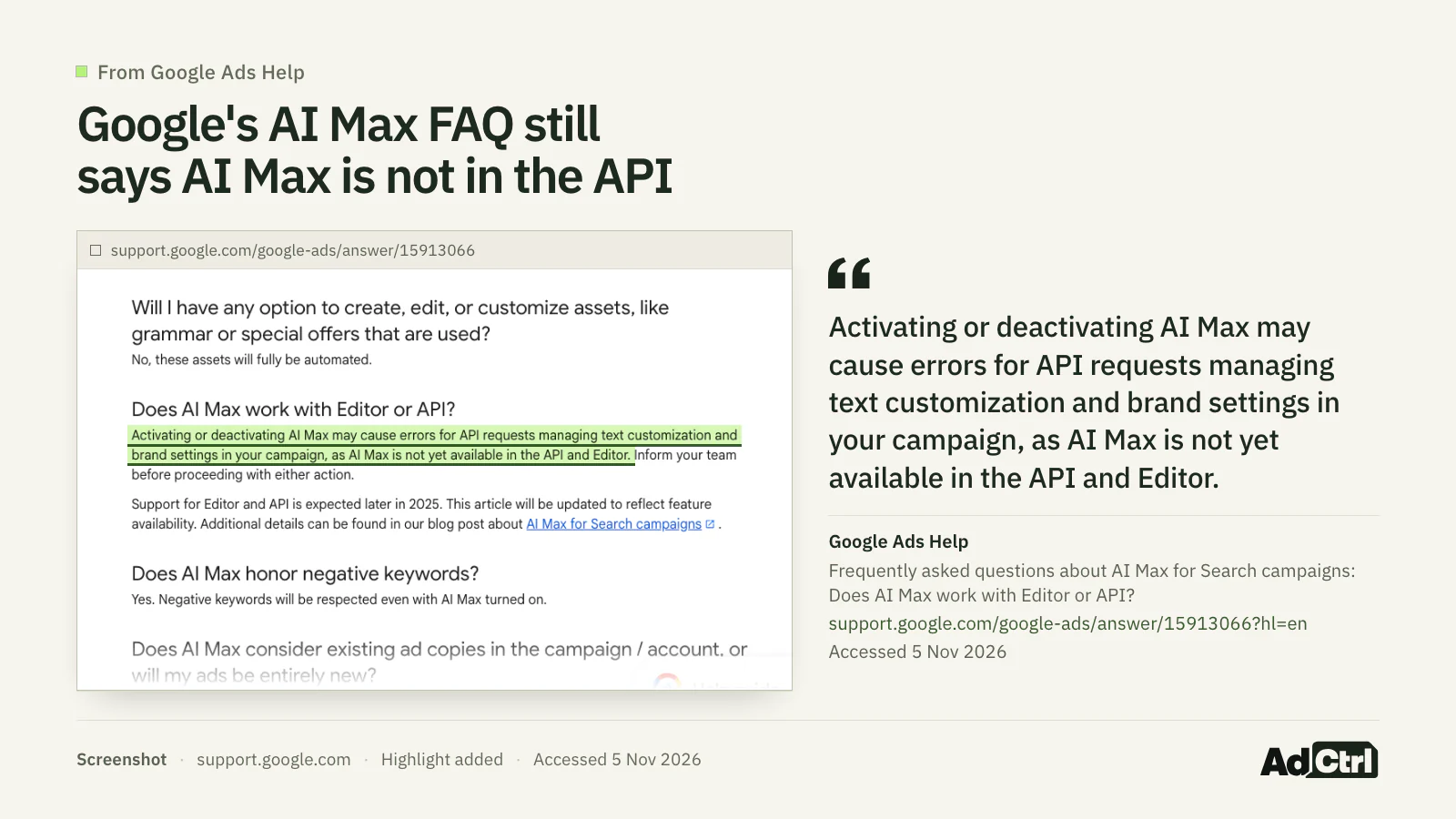
Screenshot of Google Ads Help, AI Max FAQ, 5 November 2026: the page still says AI Max is "not yet available in the API and Editor".
Trust the field reference over the FAQ. A timestamp in either migration field means Google moved that campaign to AI Max; an empty field means no auto-upgrade is recorded there.
- Manual: add the AI Max columns to the campaign list (Google says the settings "can be filtered or added as columns"), then open Settings → AI Max per campaign; in the Search terms report, filter match type "AI Max" and read the Source column.
- API: read the three campaign fields above, and
ai_max_search_term_ad_combination_viewfor search term, headline and landing page together.
What are Performance Max and Demand Gen spending on? (checks 21–26)
Performance Max is a single campaign that runs across Google's channels and inventory, and Demand Gen is the campaign type Google is moving Display campaigns into, with channel controls per ad group16, 17, 5.
You can audit Performance Max properly now. It has search terms reporting in all campaigns, campaign-level negative keyword lists and a channel performance report showing where ads ran18. Demand Gen gets the same channel report, and migrated Display campaigns land there with the Display Network switched on.
| # | Check | Where in Google Ads | Who decides |
|---|---|---|---|
| 21 | Where Performance Max spends, by channel | Campaigns → Insights and reports → Channel performance | Both |
| 22 | Performance Max search terms are reviewed, with negatives or lists added where needed | Insights and reports → Search terms; Negative keywords | Both |
| 23 | Brand exclusions on Performance Max, and the Shopping exception, are decided | Campaign Settings → Brand exclusions | Human judges |
| 24 | Asset groups have decent ad strength, and generated assets are reviewed | Asset groups; Assets report | Both |
| 25 | Placements are checked for brand suitability | Performance Max placement report | Human judges |
| 26 | Demand Gen channel controls per ad group are intended; migrated Display campaigns are reviewed | Ad group settings → Channels; Channel performance | Both |
The automated campaign types now show where they spend; these checks read that and decide what to exclude.
Source: Google Ads Help on Performance Max updates, negative keywords, brand exclusions, channel reporting, Demand Gen channel controls and the Display migration19, 20, 16, 18, 21, 17, 5
Two limits to know. Performance Max negative keywords "are applicable to Search and Shopping inventory only"20, so they don't block YouTube, Display or Gmail. Brand exclusions on Performance Max cover Search, Shopping and YouTube search inventory, with an option to let Shopping ads still show on excluded brands.
We keep finding the same thing here: brand searches flatter Performance Max or the whole account, because brand-heavy conversions make the non-brand work look better than it is. Split brand from non-brand before you judge Performance Max.
If check 22 fails, add campaign-level negatives or a negative keyword list; if check 23 fails, decide on brand exclusions with whoever owns the brand budget.
- Manual: Campaigns → Insights and reports → Channel performance, then Search terms; Demand Gen ad group settings for channels.
- In AdCtrl, write: "Show the Performance Max search-term insights and asset group reporting for last month."
- API: the channel breakdown is
segments.ad_network_typeon a Performance Max campaign (since v23), and search terms come fromcampaign_search_term_view.
Which search terms and keywords are costing money? (checks 27–32)
Search terms with spend and no conversions are usually the quickest money an audit finds. Zero conversions alone doesn't make a term irrelevant, though, so check its intent and whether tracking works before you exclude it.
| # | Check | Where in Google Ads | Who decides |
|---|---|---|---|
| 27 | Search terms with spend and no conversions are reviewed | Insights and reports → Search terms | Both |
| 28 | The match type and match source mix is known (exact, phrase, broad, AI Max, Performance Max) | Search terms → Match type and Source columns | AI can verify |
| 29 | Low-volume terms hidden for privacy are noted as a blind spot | Search terms report | Human judges |
| 30 | Negative keywords and lists are applied where needed and don't block good traffic | Keywords → Negative keywords; Shared library → Negative keyword lists | Both |
| 31 | Quality Score is read by spend, per component | Keywords → Quality Score columns | Both |
| 32 | Brand and non-brand are reported separately | Search terms, split by your brand terms | Human judges |
Search terms show what you paid for; the decision to exclude one stays with someone who knows the business.
Source: Google Ads Help on the search terms report and negative keywords; Google Ads API v26 search_term_view reference20, 22, 23
Google's report doesn't show everything. Terms that "don't have enough query activity are omitted from the search terms report" for privacy22, so some spend never shows up as a term and you can't negative it from the report.
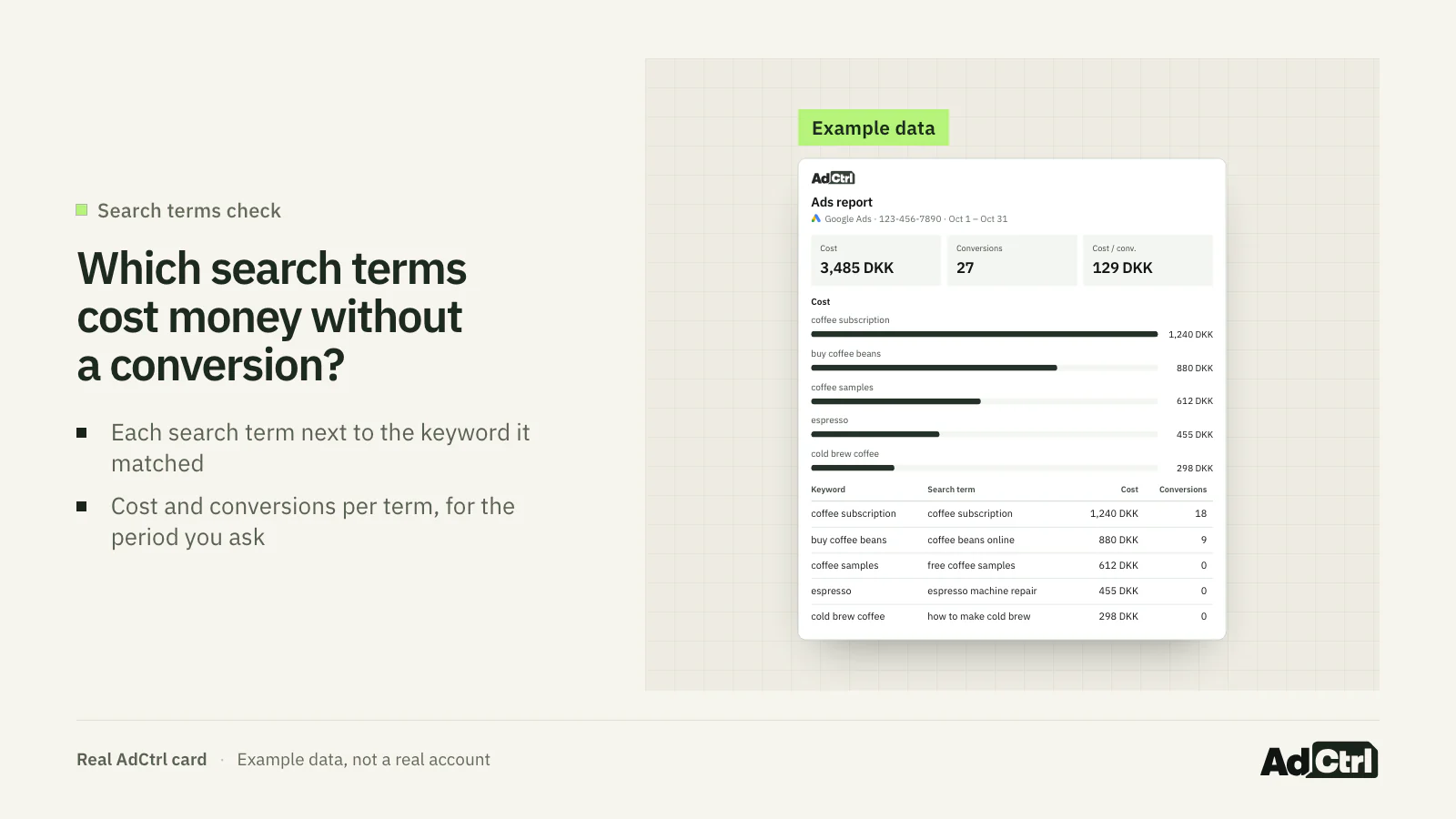
A real AdCtrl search-term report card, filled with labelled example data: each search term next to the keyword it matched, with cost and conversions, so terms that spent and never converted stand out.
Which search terms cost money last month without a single conversion? Show the match type for each, split brand searches (anything containing our brand name) from non-brand, and show Quality Score with its components for the keywords that spent the most.- Manual: Insights and reports → Search terms, sorted by cost, with Conversions, Match type and Source added; Keywords → Quality Score columns.
- With AdCtrl: write "Find search terms that don't fit my business and prepare negative keywords." AdCtrl prepares the negatives as a preview, and nothing changes until you approve it.
The full process for exclusions, match types and shared lists is in Google Ads negative keywords.
Do ads, audiences and landing pages hold up? (checks 33–35)
Ads, audiences and landing pages decide what a click turns into. Look for an approved responsive search ad in every ad group, audiences set the way you meant them, and pages that load fast on a phone where the spend lands.
| # | Check | Where in Google Ads | Who decides |
|---|---|---|---|
| 33 | Every ad group has an approved responsive search ad with decent ad strength; sitelinks and callouts are present | Ads; Assets | Both |
| 34 | Audiences are on observation or targeting as intended, and lists are large enough to use | Audiences; ad group targeting setting | Both |
| 35 | Landing pages are read by spend, mobile and speed, including pages AI Max picked | Landing pages report ("Selected by" for AI Max) | Both |
Check these once the settings above are right; they decide what a click turns into.
Source: Google Ads API v26 references for ad_group_ad, user_list and landing_page_view; Google Ads Help on AI Max landing pages14, 24
- Manual: Ads and Assets with Ad strength and Status; Audiences with the targeting setting; Landing pages with Mobile speed score.
- In AdCtrl, write: "Show ad strength and approval for every responsive search ad, the sitelinks and callouts per campaign, and my audience and Customer Match lists with their size."
Who can change the account, and what changed? (checks 36–40)
The account checks look at who can change the account, which of Google's recommendations get applied, and what changed before results moved.
| # | Check | Where in Google Ads | Who decides |
|---|---|---|---|
| 36 | Only the right people have admin access | Admin → Access and security | Both |
| 37 | Auto-tagging is on; time zone, currency, tracking template and final URL suffix are recorded | Admin → Account settings | AI can verify |
| 38 | Auto-applied recommendations are reviewed | Recommendations → Auto-apply | Both |
| 39 | Open recommendations that would undo deliberate choices are dismissed | Recommendations | Human judges |
| 40 | You know what changed before a drop, and who or what changed it | Tools → Change history | Both |
Account hygiene and history: who can touch the account, what Google applies on its own, and what changed.
Source: Google Ads Help on optimization score, auto-applied recommendations and change history; Google Ads API v26 customer and change_event references3, 25, 26, 27, 28
In audits we've run, the recommendations behind optimization score have included switching on Search partners and Display, adding a target CPA and moving to broad match, all choices the account had deliberately made the other way. My reading: the score tracks how many suggestions you adopt, so dismiss the ones that undo a deliberate decision.
Auto-apply is set for the whole account only, so if check 38 fails, switch off the recommendation types that work against those choices.
Change history has two lengths, which matters if you audit through the API:
Google Ads Help says
Change history "lists the changes made to your account, campaigns, and ad groups during the past 2 years"3.
The v26 change_event reference says
"Changes made through the UI or API in the past 30 days are included"27.
- Manual: Admin → Access and security; Recommendations → Auto-apply; Tools → Change history, filtered to the weeks before the drop.
- With AdCtrl: write "List the open recommendations, say which would undo a setting we chose on purpose, and show what changed in the last 30 days by campaign or ad group." It sees what changed, when, and on which campaign or ad group, not who made it or the before and after values.
The API fields behind each check
38 of the 40 checks map to fields in the Google Ads API v26 (consent mode and hidden search terms have none), which you can read with GAQL, the Google Ads API's query language, from a script, your own code or Google's MCP server. Two traps catch scripts: search_term_view "does not include Performance Max data"23, so Performance Max terms come from campaign_search_term_view, and change_event only goes back 30 days.
| # | Resource | Fields |
|---|---|---|
| 1 | conversion_action | primary_for_goal, include_in_conversions_metric, status, category, type |
| 2 | customer_conversion_goal, campaign_conversion_goal | customer_conversion_goal.biddable, .category, .origin; campaign_conversion_goal.biddable |
| 3 | conversion_action | counting_type |
| 4 | conversion_action | value_settings.default_value, value_settings.always_use_default_value |
| 5 | customer | conversion_tracking_setting.enablement_setting, .effective_enablement_setting, .accepted_customer_data_terms |
| 6 | none | No Ads API field verified; check the site and Tag Assistant |
| 7 | offline_conversion_upload_conversion_action_summary | daily_summaries, alerts |
| 8 | campaign | bidding_strategy_type, bidding_strategy_system_status |
| 9 | campaign, metrics | maximize_conversions.target_cpa_micros, maximize_conversion_value.target_roas; metrics.conversions, metrics.cost_micros |
| 10 | metrics | search_impression_share, search_budget_lost_impression_share, search_rank_lost_impression_share |
| 11 | campaign_budget | explicitly_shared, budget_network_settings, amount_micros, has_recommended_budget |
| 12 | campaign, segments | network_settings.target_search_network, .target_partner_search_network, .target_content_network; segments.ad_network_type |
| 13 | campaign | geo_target_type_setting.positive_geo_target_type |
| 14 | campaign_criterion | location.geo_target_constant, negative |
| 15 | campaign | primary_status, primary_status_reasons |
| 16 | campaign | ai_max_setting.enable_ai_max, aca_migration_date_time, broad_match_migration_date_time, keyword_match_type |
| 17 | campaign, metrics | bidding_strategy_type; metrics.search_budget_lost_impression_share |
| 18 | campaign | asset_automation_settings |
| 19 | campaign_criterion | brand_list.shared_set |
| 20 | ai_max_search_term_ad_combination_view | search_term, headline, landing_page |
| 21 | campaign, segments | segments.ad_network_type on Performance Max (since v23) |
| 22 | campaign_search_term_view, campaign_criterion | search_term; keyword.text, negative |
| 23 | campaign_criterion, campaign | brand_list.shared_set; shopping_setting.ignore_brand_exclusion_in_shopping_ads |
| 24 | asset_group, asset_group_asset | ad_strength, primary_status; source, field_type, metrics.conversions |
| 25 | performance_max_placement_view | placement, placement_type |
| 26 | ad_group, campaign, segments | demand_gen_ad_group_settings.channel_controls.channel_strategy; advertising_channel_type; segments.ad_sub_network_type |
| 27 | search_term_view, metrics | search_term, status, segments.keyword.info.text; metrics.cost_micros, metrics.conversions |
| 28 | segments | search_term_match_type, search_term_match_source |
| 29 | none | No API field found that lists hidden terms |
| 30 | campaign_criterion, shared_set, campaign_shared_set | keyword.text, negative; shared_set.type; campaign_shared_set.shared_set |
| 31 | ad_group_criterion | quality_info.quality_score, .search_predicted_ctr, .creative_quality_score, .post_click_quality_score |
| 32 | search_term_view | search_term, matched against your brand terms |
| 33 | ad_group_ad, campaign_asset | ad_strength, policy_summary.approval_status; field_type, source |
| 34 | ad_group, user_list | targeting_setting.target_restrictions; size_for_search, membership_status |
| 35 | landing_page_view, expanded_landing_page_view | unexpanded_final_url, metrics.speed_score, metrics.mobile_friendly_clicks_percentage; expanded_final_url |
| 36 | customer_user_access | email_address, access_role, access_creation_date_time |
| 37 | customer | auto_tagging_enabled, time_zone, currency_code, tracking_url_template, final_url_suffix |
| 38 | recommendation_subscription | type, status |
| 39 | customer, recommendation | optimization_score; type, dismissed |
| 40 | change_event | change_date_time, user_email, client_type, change_resource_type, changed_fields, old_resource, new_resource |
One row per check: the v26 resource and the fields that answer it, each matched against its own field reference page on 5 November 2026.
Source: Google Ads API v26 field references for campaign, search_term_view, campaign_search_term_view, change_event, customer and the other resources; API release notes2, 13, 23, 29, 27, 28, 24
Performance Max's network breakdown arrived in the API in v23. Don't treat it as the channel report: Google's release note calls it an "ad network type breakdown" and doesn't promise the API rows match the channel performance report row for row.
Can AI audit a Google Ads account?
An AI connected to the account can run most of this audit: 7 of the 40 checks it can settle from the data alone, and it can prepare the 23 marked "Both" for you. The 10 marked "Human judges" stay with someone who knows the margins and what the business wants to sell more of.
Google Ads MCP server: Google's own server;
search"Executes GAQL requests to fetch resource metrics, budgets, and status", and the docs give the mode as "Read-only (current release)"30(Official)
Recommendations: Google's built-in suggestions and optimization score; can be auto-applied for the whole account
(Built in)
AdCtrl: Reads reports, settings, search terms, conversion actions and change history in Claude or ChatGPT; changes wait for your approval
(Connector)
Markifact: Its page: Google Ads "inside Claude, ChatGPT, and other MCP clients for audits, reporting, optimization, and campaign actions", and you "approve actions before anything goes live"
(Connector)
Ryze AI: Its Claude page: "14 Google Ads tools: 8 read including raw GAQL and Keyword Planner, 6 approval-gated writes"
(Connector)
Adspirer: Its homepage: "Ask for a campaign, audit, report, or recurring account check."; "Every high-impact change stays yours to approve."
(Connector)

Google's docs list its server as read-only, and the three other connectors each say changes wait for your approval. AdCtrl doesn't read user access (check 36), and I don't claim its reads for AI Max settings (checks 16–20), the Performance Max channel breakdown (21), or auto-tagging and auto-apply settings (37–38) today, so check those by hand.
The prompt below is the one behind the conversion-actions table in the measurement section, run with read-only requests on our own paused test account.
Audit my Google Ads account: list conversion actions and their settings, campaign settings, impression share and bidding status, the last 30 days of search terms with match type, and open recommendations. Flag what a human should judge.None of these tools makes the judgement calls for you, and none of them should. I'd let the AI do the reading and keep the decisions on brand, Search partners and AI Max with a person.
The full Google Ads audit checklist
The full Google Ads audit checklist below has all 40 checks in the order above, one yes-or-no line each, so you can tick it off as you go. A "no" in the measurement checks comes first.
- Check 1: Only real business outcomes are primary conversions.
- Check 2: The goals each campaign bids toward match the business goal.
- Check 3: Counting fits each action (one per click for leads).
- Check 4: Conversion values are set and reflect real value.
- Check 5: Enhanced conversions are switched on.
- Check 6: Consent mode is in place for EEA and UK traffic.
- Check 7: Offline and lead uploads are healthy, and API uploads go through the Data Manager API.
- Check 8: Each bid strategy has enough conversions and isn't limited.
- Check 9: CPA and ROAS targets are realistic against actual results.
- Check 10: Lost impression share to budget and to rank were read before raising budgets.
- Check 11: Shared budgets and budget channel settings are known.
- Check 12: Search partners and Display on Search campaigns earn their spend.
- Check 13: Each campaign's location option fits the business.
- Check 14: Targeted and excluded locations match where you sell.
- Check 15: No campaign is quietly limited.
- Check 16: You know which Search campaigns run AI Max and which were auto-upgraded.
- Check 17: AI Max campaigns use conversion-based Smart Bidding and aren't budget-limited.
- Check 18: Final URL expansion and text customization are on only where pages and copy can take it.
- Check 19: AI Max URL exclusions and brand settings are set.
- Check 20: AI Max search terms, headlines and landing pages were read together.
- Check 21: You know where Performance Max spends by channel.
- Check 22: Performance Max search terms were reviewed and negatives added where needed.
- Check 23: Performance Max brand exclusions are decided.
- Check 24: Asset groups have decent ad strength and generated assets were reviewed.
- Check 25: Performance Max placements were checked for brand suitability.
- Check 26: Demand Gen channel controls are intended and migrated Display campaigns reviewed.
- Check 27: Search terms with spend and no conversions were reviewed.
- Check 28: The match type and match source mix is known.
- Check 29: Hidden low-volume search terms are noted as a blind spot.
- Check 30: Negative keywords and lists block waste without blocking good traffic.
- Check 31: Quality Score was read by spend and by component.
- Check 32: Brand and non-brand are reported separately.
- Check 33: Every ad group has an approved responsive search ad, plus sitelinks and callouts.
- Check 34: Audiences are on observation or targeting as intended, with usable list sizes.
- Check 35: Landing pages that get the spend were checked on mobile speed.
- Check 36: Only the right people have admin access.
- Check 37: Auto-tagging is on and account settings are recorded.
- Check 38: Auto-applied recommendations were reviewed.
- Check 39: Recommendations that undo deliberate choices were dismissed.
- Check 40: You know what changed before any drop in results.
Frequently asked questions
Is optimization score an audit?
No. Google calls it "an estimate of how well your Google Ads account is set to perform", calculated from your settings and the recommendations available25. A high score can mean you accepted suggestions that don't fit the business, so read the recommendations one by one instead.
Did Google turn on AI Max in my campaigns?
Possibly. New Search campaigns have AI Max on by default, and Search campaigns with automatically created assets or campaign-level broad match are auto-upgraded from September 2026. Add the AI Max columns to the campaign list, or read campaign.aca_migration_date_time and campaign.broad_match_migration_date_time in the API.
Is there a free Google Ads audit template?
The checklist in this article is the template: 40 yes-or-no lines you can print or paste into a sheet. The table of API fields turns each line into a query if you want to automate it.
How often should you audit a Google Ads account?
My own rhythm: the full 40 when I inherit an account or results move without an obvious reason, and the measurement and search terms checks every month. Google keeps changing defaults, so recheck the AI Max and Performance Max rows after each announcement.
Can I see who changed a setting?
In Google Ads, Tools → Change history shows changes for the past two years. The API's change_event resource has a user_email field but only covers the past 30 days.
What to do next
Start with the measurement checks. If the primary conversion is wrong, fix it before you judge anything else, then work down the list by money at risk: settings, the AI Max and Performance Max defaults, search terms, then ads, audiences, pages and history. Mark every line yes or no, and keep the "Human judges" lines for someone who knows the business.
Learn more: GA4 conversions don't match Google Ads goes deep on measurement, Google Ads MCP compares the official server with hosted connectors, and Claude for Google Ads covers day-to-day use.
Try it: connect AdCtrl with the getting started steps, paste the audit prompt above into Claude or ChatGPT, and go through what comes back with this list next to you. Try every feature free for 3 days, no card needed31. AdCtrl can apply nothing until you approve it.
Sources
- We're upgrading Dynamic Search Ads to AI Max, Google (Ads & Commerce Blog), 15 April 2026. Accessed 5 November 2026.
- Google Ads API release notes, Google, 30 October 2026. Accessed 5 November 2026.
- About change history, Google. Accessed 5 November 2026.
- Set up AI Max for Search campaigns, Google. Accessed 5 November 2026.
- Google Display Ads campaigns have a new home in Demand Gen, Google. Accessed 5 November 2026.
- About conversion goals, Google. Accessed 5 November 2026.
- About conversion counting options, Google. Accessed 5 November 2026.
- About offline conversion imports, Google. Accessed 5 November 2026.
- Updates to your enhanced conversions settings, Google. Accessed 5 November 2026.
- About consent mode, Google. Accessed 5 November 2026.
- About channel prioritization and budget allocation, Google. Accessed 5 November 2026.
- About advanced location options, Google. Accessed 5 November 2026.
- Google Ads API v26 field reference: campaign, Google. Accessed 5 November 2026.
- How AI Max for Search campaigns works, Google. Accessed 5 November 2026.
- Frequently asked questions about AI Max for Search campaigns, Google. Accessed 5 November 2026.
- About the channel performance report, Google. Accessed 5 November 2026.
- Channel controls in Demand Gen campaigns, Google. Accessed 5 November 2026.
- Access new inventory and channel performance reporting in Performance Max campaigns, Google (Google Ads Help announcement), 6 November 2025. Accessed 5 November 2026.
- Unlock more visibility and control in Performance Max, Google (Google Ads Help announcement), 7 August 2025. Accessed 5 November 2026.
- Negative keywords in Performance Max campaigns, Google. Accessed 5 November 2026.
- Apply brand exclusions to Performance Max or Search campaigns, Google. Accessed 5 November 2026.
- About the search terms report, Google. Accessed 5 November 2026.
- Google Ads API v26 field reference: search_term_view, Google. Accessed 5 November 2026.
- Google Ads API v26 field reference: other resources used by the checks, Google. Accessed 5 November 2026.
- About optimization score, Google. Accessed 5 November 2026.
- About applying recommendations automatically, Google. Accessed 5 November 2026.
- Google Ads API v26 field reference: change_event, Google. Accessed 5 November 2026.
- Google Ads API v26 field reference: customer, Google. Accessed 5 November 2026.
- Google Ads API v26 field reference: campaign_search_term_view, Google. Accessed 5 November 2026.
- Google Ads MCP server, Google, 30 October 2026. Accessed 5 November 2026.
- AdCtrl: pricing and free trial (homepage), AdCtrl. Accessed 5 November 2026.
- About AI Max for Search campaigns, Google. Accessed 5 November 2026.
- AdCtrl docs: connect Google Ads and Meta Ads to Claude or ChatGPT, AdCtrl. Accessed 5 November 2026.
- Unlock next-level performance with AI Max for Search campaigns, Google (Ads & Commerce Blog), 6 May 2025. Accessed 5 November 2026.
- Markifact MCP, Markifact. Accessed 5 November 2026.
- Ryze AI: Google Ads in Claude (MCP page), Ryze AI. Accessed 5 November 2026.
- Adspirer homepage, Adspirer. Accessed 5 November 2026.
- Own data: A lead-gen account bid toward a zero-value form fill as its only primary conversion while the qualified-lead action sat outside the Conversions column; an e-commerce account's Maximize Conversions goal partly chased cart events.. Sample: agency audit records (anonymised; count not published). Period: May–October 2026. Measure: count. Anonymised from agency audit records, May–October 2026; no client, number or identifying detail; mapping for the fact reviewer in tmp/blog-review/google-ads-audit-checklist-cases.md (gitignored).
- Own data: Campaigns on the default "Presence or interest" location option spent on people outside the intended market (one account) or on interest-area clicks with no recorded conversions (another).. Sample: agency audit records (anonymised; count not published). Period: May–October 2026. Measure: count. Anonymised from agency audit records, May–October 2026; no client, number or identifying detail; mapping for the fact reviewer in tmp/blog-review/google-ads-audit-checklist-cases.md (gitignored).
- Own data: Search campaigns also serving on Search partners and the Display Network, with spend and no conversions on those networks; a Shopping campaign's search partner traffic likewise had none.. Sample: agency audit records (anonymised; count not published). Period: May–October 2026. Measure: count. Anonymised from agency audit records, May–October 2026; no client, number or identifying detail; mapping for the fact reviewer in tmp/blog-review/google-ads-audit-checklist-cases.md (gitignored).
- Own data: Optimization-score recommendations (Search partners, Display, target CPA, broad match) that would have reversed deliberate choices; the agency declined them rather than chase the score.. Sample: agency audit records (anonymised; count not published). Period: May–October 2026. Measure: count. Anonymised from agency audit records, May–October 2026; no client, number or identifying detail; mapping for the fact reviewer in tmp/blog-review/google-ads-audit-checklist-cases.md (gitignored).
- Own data: Brand searches flattering Performance Max or whole-account results: brand-heavy conversions made reported performance look better than the non-brand work.. Sample: agency audit records (anonymised; count not published). Period: May–October 2026. Measure: count. Anonymised from agency audit records, May–October 2026; no client, number or identifying detail; mapping for the fact reviewer in tmp/blog-review/google-ads-audit-checklist-cases.md (gitignored).
- Own data: Read-only AdCtrl audit of our own paused Google Ads test account: conversion action settings. Prompt: "Audit my Google Ads account: list conversion actions and their settings, campaign settings, impression share and bidding status, the last 30 days of search terms with match type, and open recommendations. Flag what a human should judge." Findings: two YouTube engagement actions set primary next to lead actions; one lead action counting many per click; one offline stage with a 90-day lookback where the others use 30; offline stages all secondary.. Sample: one account. Period: 5 Nov 2026. Measure: count. Read-only AdCtrl audit of our own paused test account, 5 Nov 2026, anonymised; capture file tmp/blog-review/google-ads-audit-checklist-captures/audit-capture-2026-11-05.md | own test account, all campaigns paused; no spend or performance stated; no account name or ID.