Conversion Discrepancy
GA4 conversions don't match Google Ads (or Meta): how to tell a normal gap from broken tracking
Which side is higher and why, the exact columns, settings and API fields to line up, and a decision tree for the gap that's left.

By Kaan Catalkaya, Founder of AdCtrl
· 18 min read
Short answer
- Google says discrepancies with Google Analytics, 'often up to 20%', are expected. That is not a ceiling, and it says nothing about Meta.
- Compare GA4 with Google Ads' All conv. (by conv. time) column: the standard Conversions column counts on the click date and only includes primary actions.
- GA4 key events and Google Ads conversions are different things: Google Ads conversions don't appear in GA4's Reports or Explore sections, they show in the Advertising section, and conversions created in GA4 start as secondary.
- My rule of thumb: a gap that survives the line-up and stays steady is normal. One sale counted twice, by two primary actions or two tags, is broken, so check those first.
- Two primary actions for the same sale, such as a GA4 import plus a Google Ads tag, put it in the Conversions column twice. Rule that out before you blame attribution.
Check Google Ads, GA4 and Tag Manager in one chat with AdCtrl
Start free3-day free trial · no card needed
GA4 conversions don't match Google Ads because each tool counts something different: Google Ads' Conversions column counts primary actions on the ad-click date, GA4 counts key events on the day they happen, under its own attribution model. Google calls gaps "often up to 20%" expected1, 2. My rule of thumb: a gap that stays steady after you line the numbers up is normal, and one sale counted twice is broken.
I build AdCtrl, a connector that puts Google Ads, Meta Ads, GA4 and Tag Manager into one Claude or ChatGPT conversation, so each step below also has a read-only AdCtrl route. Server-side fixes live in Google Ads offline conversions and Meta Conversions API. Checked 4 November 2026 against Google's and Meta's own docs3, 4.
Why don't GA4 conversions match Google Ads?
GA4 and Google Ads disagree mostly because they put the same sale on different days and count different sets of actions. Google's own example: a click on 19 July and a purchase on 20 July shows up on 19 July in Google Ads and on 20 July in Google Analytics2.
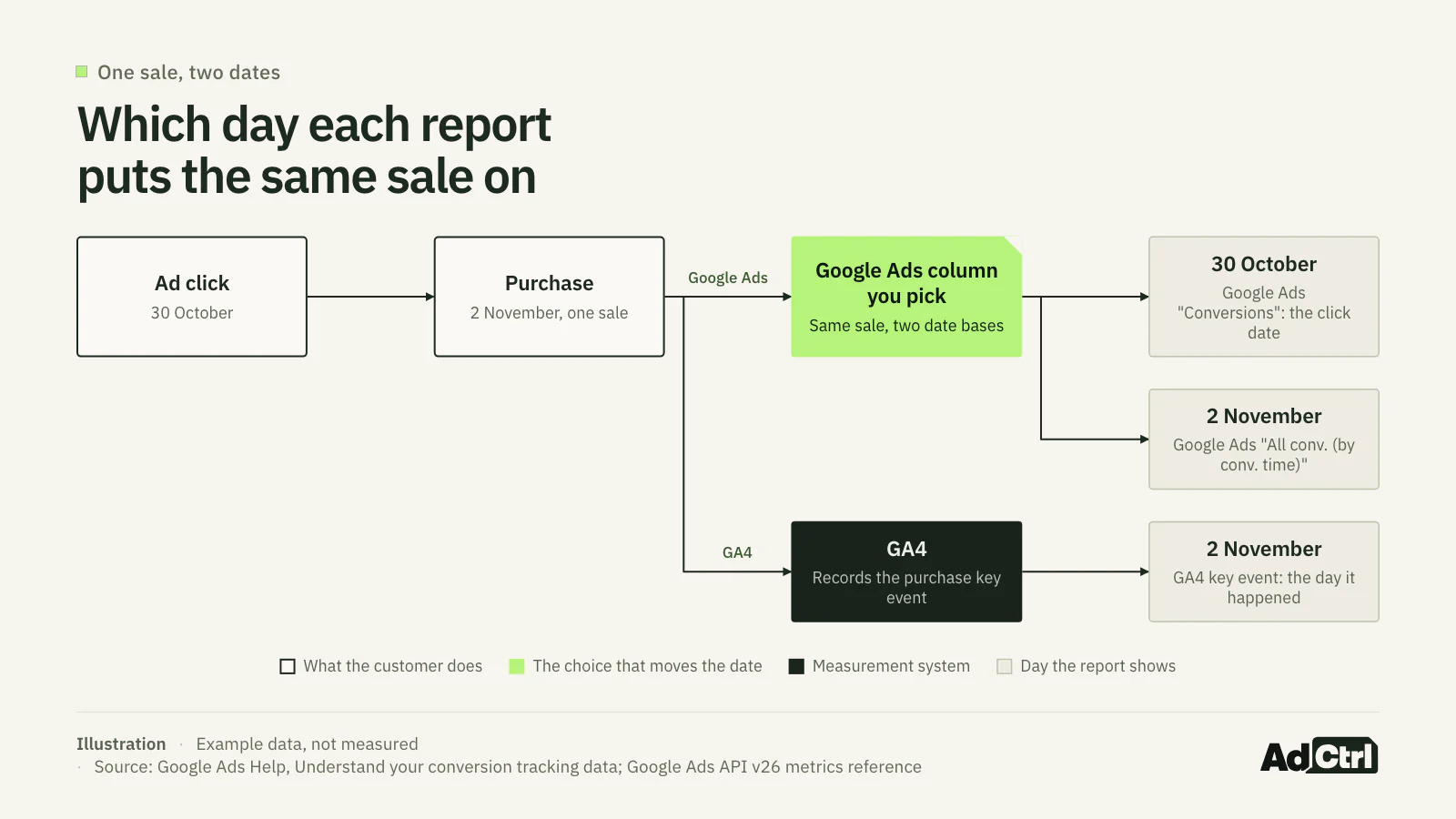
Illustration with example dates: one sale, clicked on 30 October and bought on 2 November, lands on the click date in Google Ads' Conversions column and on the purchase date in All conv. (by conv. time) and in GA4.
The date is only the first reason. Google's help pages name five more:
- Primary vs all actions: the Conversions column holds primary actions only, while "All conv." adds secondary actions and view-through conversions.
- Attribution model: Google says GA4 defaults to data-driven attribution, "while Google Ads uses ad-centric models".
- Counting: an action set to "One" reports one conversion for two events after a click; "Every" may report two.
- Invalid clicks: some GA4 events are filtered out on import into Google Ads.
- Lag: imported GA4 conversions arrive up to 24 hours later, and reports can lag 24 to 48 hours.
GA4 also uses two words for what Google Ads calls one. A key event is any action you mark as important in GA4. A "conversion" is a key event shared with Google Ads to measure campaigns and bid. Google Ads conversions "don't appear in standard Google Analytics reports in the Reports or Explore sections"; they show in the Advertising section's Conversion performance report3.
How big a gap between GA4 and Google Ads is normal?
Google's help page gives one range: "Discrepancies, often up to 20%, are expected due to different attribution models". The sentence is about comparing Google Ads with "third-party analytics like Google Analytics or Shopify", and the same page adds that "reporting lags can take up to 24-48 hours"1.
- up to 20% gap Google calls "often" expected vs third-party analytics
- 24–48 h reporting lag Google mentions
- 90 days GA4's default lookback for most key events5
- 1–90 days the range for a Google Ads conversion window
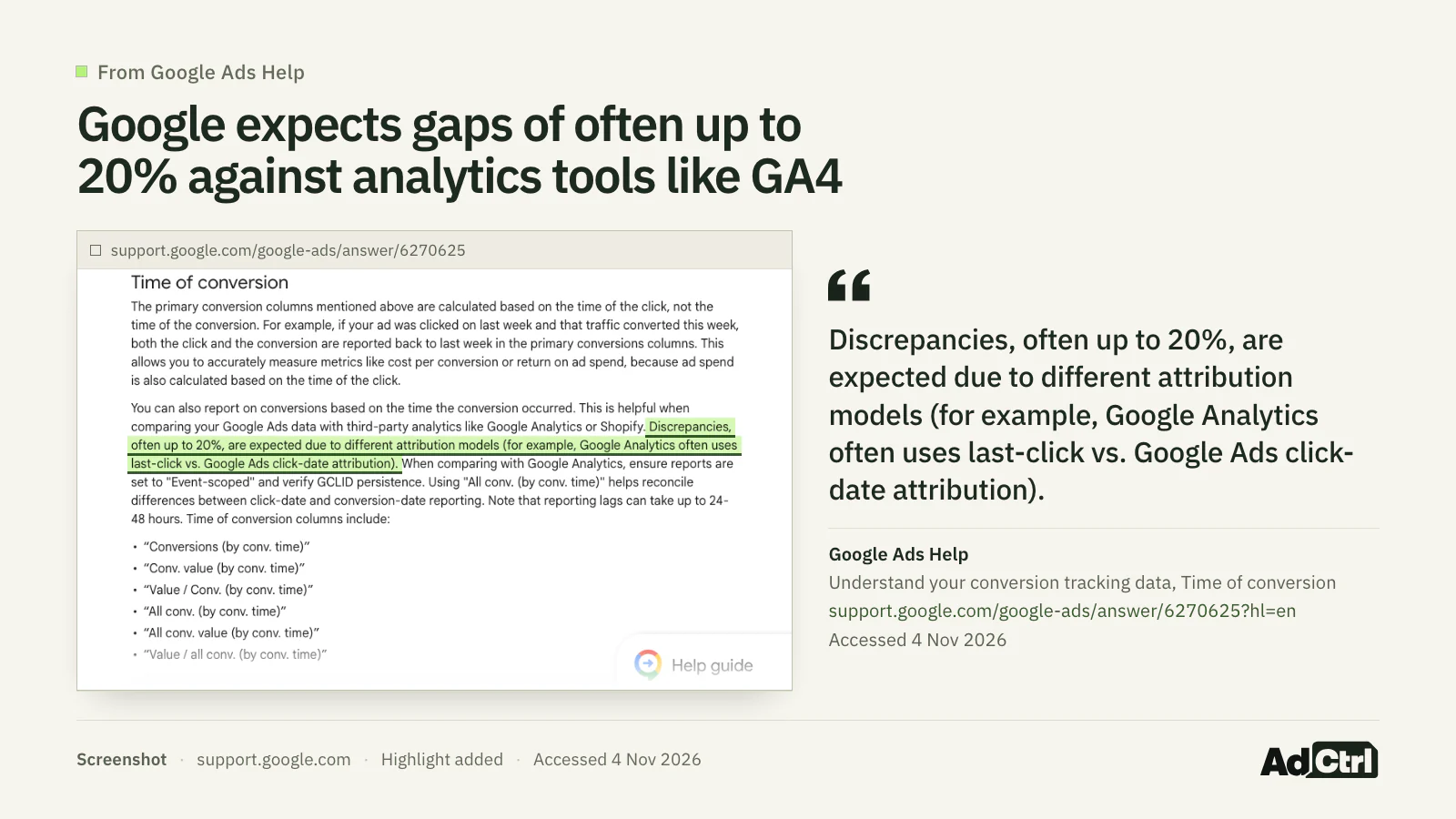
Screenshot of Google Ads Help, 4 November 2026: Google expects discrepancies "often up to 20%" when you compare Google Ads with other analytics.
Google's 20% is a description, not a ceiling. Nowhere does Google say 21% means broken or 5% means healthy, and the sentence is about analytics tools, not Meta. Meta's pages I read give no range of their own. Check the settings below whatever the size of your gap.
Is GA4 higher than Google Ads, or the other way round?
Which side is higher tells you where to look first. Google Ads higher than GA4 points at what Google Ads adds, such as view-through or duplicate conversions. GA4 higher points at what Google Ads leaves out, such as secondary actions or lost click IDs1, 6, 2.
| What you see | Likely causes, based on Google's definitions | Where to check |
|---|---|---|
| Google Ads higher | All conv. includes view-through conversions; Conversions "may include modeled conversions"; two primary actions for one sale | Column choice; conversion action settings (step 3) |
| Google Ads higher | GA4's own attribution gives part of the credit to other channels; Google Ads uses ad-centric models | GA4 attribution settings (step 4) |
| GA4 higher | The action is secondary, so it is missing from Conversions; invalid clicks filtered on import; Google Ads counting set to One | Conversion action settings (step 3) |
| GA4 higher | A redirect drops the GCLID, so Google Ads can't tie the sale to the click | Your landing page redirects (step 6) |
| Either way | Different time zones; click date vs conversion date at the edges of the range; a shorter conversion window on one side | Steps 1, 2 and 4 |
The direction of the gap narrows the search before you open any setting.
Source: Google Ads Help on conversion data, primary and secondary actions and GA4 imports; GA4 attribution help1, 6, 2, 5
Run this quick check before the full procedure. It only needs the reports and the list of conversion actions.
Put the same complete date range on both sides and switch Google Ads to All conv. (by conv. time) for the one action you compare.
Manual: Google suggests that column for comparisons with Google Analytics.
With AdCtrl: write "Show last month's purchases in Google Ads and GA4 for the same dates."
Note which side is higher and find the row above.
Manual: compare per conversion action, not account totals.
With AdCtrl: write "Put the Google Ads and GA4 counts side by side per conversion action."
Check that each sale has exactly one primary action.
Manual: open the conversion actions in Google Ads and look for a GA4 import and a website tag both set to Primary.
With AdCtrl: write "List my conversion actions and goals and flag any sale with two primary actions."
How do you reconcile Google Ads and GA4, step by step?
The full reconciliation is six reads in a fixed order: the comparison itself, Google Ads columns, action settings, GA4, Meta and the tags. Each step has a manual route and the exact read-only words to write in Claude or ChatGPT with AdCtrl connected, which reads Google Ads, GA4 and Tag Manager in one conversation. Nothing here changes an account.
Google's official servers can run the Google Ads and GA4 report reads on their own: search executes GAQL queries for Google Ads, and run_report runs a GA4 report through the Data API.
Step 1: same action, dates and time zones
Compare one action over one complete date range that ended at least 48 hours ago. GA4 reports in the property's time zone and Google Ads in the account's, so write both down. If they differ, the days split differently.
- Manual: pick the sale or lead, for example
purchasein GA4 and the matching Google Ads conversion action, and note both time zones. - In AdCtrl, write: "Which Google Ads action and GA4 key event both measure purchases?"
List my Google Ads conversion actions and goals, and my GA4 key events. Match them up: which Google Ads action and which GA4 key event both measure purchases?Step 2: Google Ads by click date and by conversion date
Add four columns per conversion action: Conversions, Conversions (by conv. time), All conv. and All conv. (by conv. time). In the API they are metrics.conversions, metrics.conversions_by_conversion_date, metrics.all_conversions and metrics.all_conversions_by_conversion_date. A click last week that converts this week shows this week in the by-conversion-time columns, while the standard columns "will still count the click and conversion in the previous week"7, 8.
- Manual: add the four columns to a report for the range, per conversion action.
- In AdCtrl, write: "Show conversions by click date and by conversion date, with the column for each number, and say if you can only get one."
For last month, show Google Ads conversions per conversion action counted by click date and by conversion date, plus all conversions. Tell me which column each number comes from, and say so if you can only get one of them.Step 3: which conversion actions count
Step 3 is where duplicates hide. A primary action counts in the Conversions column and in bidding; a secondary one is "for observation only". Conversions created from GA4 start as secondary "and can only be updated to primary in Google Ads", so a GA4 import someone switched to primary next to a website tag for the same sale counts that sale twice6.
- Manual: open each action's settings. "Conversion action optimization" shows Primary or Secondary (observe only); the source shows a GA4 import or a website tag; counting is One or Every.
- In AdCtrl, write: "List my conversion actions and flag any sale with two primary actions."
List my Google Ads conversion actions with whether each is primary or secondary, whether it comes from a GA4 import or a website tag, whether it counts one or every conversion, and its click-through window. Flag any sale or lead that has two primary actions.If you only run one step, I'd make it this one. A duplicate primary action feeds bidding a sale counted twice, while a date or attribution gap mostly makes the report look odd.
Step 4: GA4 key events and attribution settings
In GA4, look at key events by Event name, then at Advertising, Conversion performance, then at the property's reporting attribution model and lookback windows. Google's own instruction for this comparison: "When comparing with Google Analytics, ensure reports are set to "Event-scoped" and verify GCLID persistence."1, 3
Event-scoped dimensions such as Source, Medium and Campaign follow the reporting attribution model, while session-scoped ones such as Session source "are unaffected". Most key events default to a 90-day lookback.
- Manual: Reports for key events, Advertising for the shared conversions, the property's attribution settings for the model.
- In AdCtrl, write: "Show GA4 key events for google / cpc sessions and the attribution settings."
In GA4, show key events by event name for sessions with source / medium google / cpc for last month. Then tell me the property's reporting attribution model and key event lookback window.Step 5: Meta results and their attribution setting
Meta says results from ad sets with different attribution models can't be compared in the Campaign Overview table, so check each ad set's attribution model and setting before you add anything up. The Meta section below covers the details.
- Manual: in Ads Manager, use Compare Attribution Settings before you compare ad sets.
- In AdCtrl, write: "Show Meta purchases by campaign and the attribution setting they use, or say if you can't see it."
Show Meta purchases for last month by campaign. Tell me which attribution setting these results use. If you can't see it, say so instead of guessing.Step 6: tags that fire twice
Run a test sale in Tag Manager's Preview mode. The site connects to Tag Assistant "so that you can inspect which tags fired and in which order". The duplicate checklist further down lists what to look for.
- Manual: one test purchase, then count each conversion tag in Tag Assistant.
- In AdCtrl, write: "List the conversion tags and triggers in my Tag Manager container." That shows configuration, not firing.
Review my Tag Manager container for conversion tags. List any action with two tags, or a tag whose triggers could fire twice on the same page. Remember that you see the configuration, not what fired.The API field names, side by side
For anyone pulling the numbers by GAQL (the Google Ads API's query language), the GA4 Data API or Meta's Marketing API, match fields on date and on the set of actions before comparing them. Use keyEvents by eventName for the GA4 count. Split it by googleAdsCampaignName for GA4's attributed view, and by a session-scoped field when you want numbers that don't move if someone changes the attribution model.
| Tool | Interface name | API field | What it counts and when to use it |
|---|---|---|---|
| Google Ads | Conversions | metrics.conversions | Actions with include_in_conversions_metric true, by click date; what bidding optimises for |
| Google Ads | Conversions (by conv. time) | metrics.conversions_by_conversion_date | The same actions, by conversion date |
| Google Ads | All conv. | metrics.all_conversions | All actions, whatever include_in_conversions_metric says, by click date |
| Google Ads | All conv. (by conv. time) | metrics.all_conversions_by_conversion_date | All actions, as in All conv., by conversion date; compare it with GA4 per action, not as an account total |
| Google Ads | Primary / Secondary | conversion_action.primary_for_goal | false means not biddable, except in a custom goal |
| Google Ads | Source of the action | conversion_action.type | GOOGLE_ANALYTICS_4_CUSTOM or GOOGLE_ANALYTICS_4_PURCHASE for GA4 imports, WEBPAGE for a website tag |
| Google Ads | Count: One / Every | conversion_action.counting_type | ONE_PER_CLICK or MANY_PER_CLICK |
| Google Ads | Click-through conversion window | conversion_action.click_through_lookback_window_days | Days allowed between click and conversion |
| GA4 | Key events | keyEvents | Count of key events, by event date; marking one doesn't change history |
| GA4 | Session source / medium | sessionSourceMedium | Session-scoped; unaffected by the reporting attribution model |
| GA4 | Session Google Ads campaign | sessionGoogleAdsCampaignName | The campaign "that led to this session" |
| GA4 | Google Ads campaign | googleAdsCampaignName | The campaign "attributed to the key event" |
| Meta | Attribution setting | action_attribution_windows | Windows such as 7d_click; for reads, default means ["7d_click","1d_view"] |
| Meta | (none) | action_report_time | Still in the reference, disregarded since 10 June 2025 |
Line up fields that count on the same date and the same set of actions, or the gap you measure is partly your own query.
Source: Google Ads API v26 metrics and ConversionAction references, GA4 Data API schema and attribution help, Meta Ad Account Insights reference and 2025 changes8, 9, 10, 11, 2, 5, 12, 13, 14
For GA4, I found no Data API metric for the Advertising section's Conversions, only keyEvents; check the Conversion performance report in the interface.
Is the gap normal or broken?
A gap is normal when it survives the line-up and stays stable, and broken when an action is counted twice or the gap jumps for no reason you can point to. Work through the questions in this order. Only the 20% comes from Google, the rest are my rules of thumb1, 2.
Decision tree: line up dates, time zones and the action, switch to All conv. (by conv. time) for that action, check for duplicate counting when Google Ads shows more, then call a stable gap within about 20% normal and anything else worth investigating. The 20% is Google's "often up to 20%" for third-party comparisons; "stable week to week" is a heuristic, not a Google rule.
Normal: attribution and lag, if
- Dates, time zones and the action match on both sides
- You compare GA4 with All conv. (by conv. time) for one action
- No action is counted twice, and the gap is within roughly 20% and steady week to week (heuristic)
Broken: duplicate counting, if
- Google Ads shows more than GA4 for the action
- A GA4 import and a Google Ads tag are both primary for it, or two tags fire on one sale
Investigate, if
- The gap is well past 20% or jumps between weeks (heuristic)
- Check tag firing, consent and redirects that drop the GCLID, Google's click identifier
How does Meta count conversions, and how do you compare it with GA4?
Meta counts a conversion against an ad when it happens inside the ad set's attribution setting (for Meta's standard attribution model), chosen per ad set. The settings are click-through (1 or 7 days after a link click), view-through (1 day after an impression) and engage-through (1 day after a non-link click). Some accounts still use the older versions while this rolls out.
In practice, compare Meta with Meta first and with GA4 second. Ad sets with different attribution models can't be compared in the Campaign Overview table, so Meta points you to Compare Attribution Settings, and adds: "If using external analytics tools, evaluate performance in those tools." My reading: judge a Meta campaign's share of sales in GA4, and read Meta's own count for the ad set comparisons inside Ads Manager.
For API users, two parameters stopped doing anything. Meta's Insights reference still documents action_report_time and use_unified_attribution_setting, while Meta's changelog says both are disregarded:
Meta's API reference says
action_report_time decides the report date: with impression a conversion shows on the day of the ad view, with conversion on the day of the conversion.
Meta's 2025 changes say
From 10 June 2025, use_unified_attribution_setting and action_report_time "will be disregarded, and API responses will mimic Meta Ads Manager settings"14.
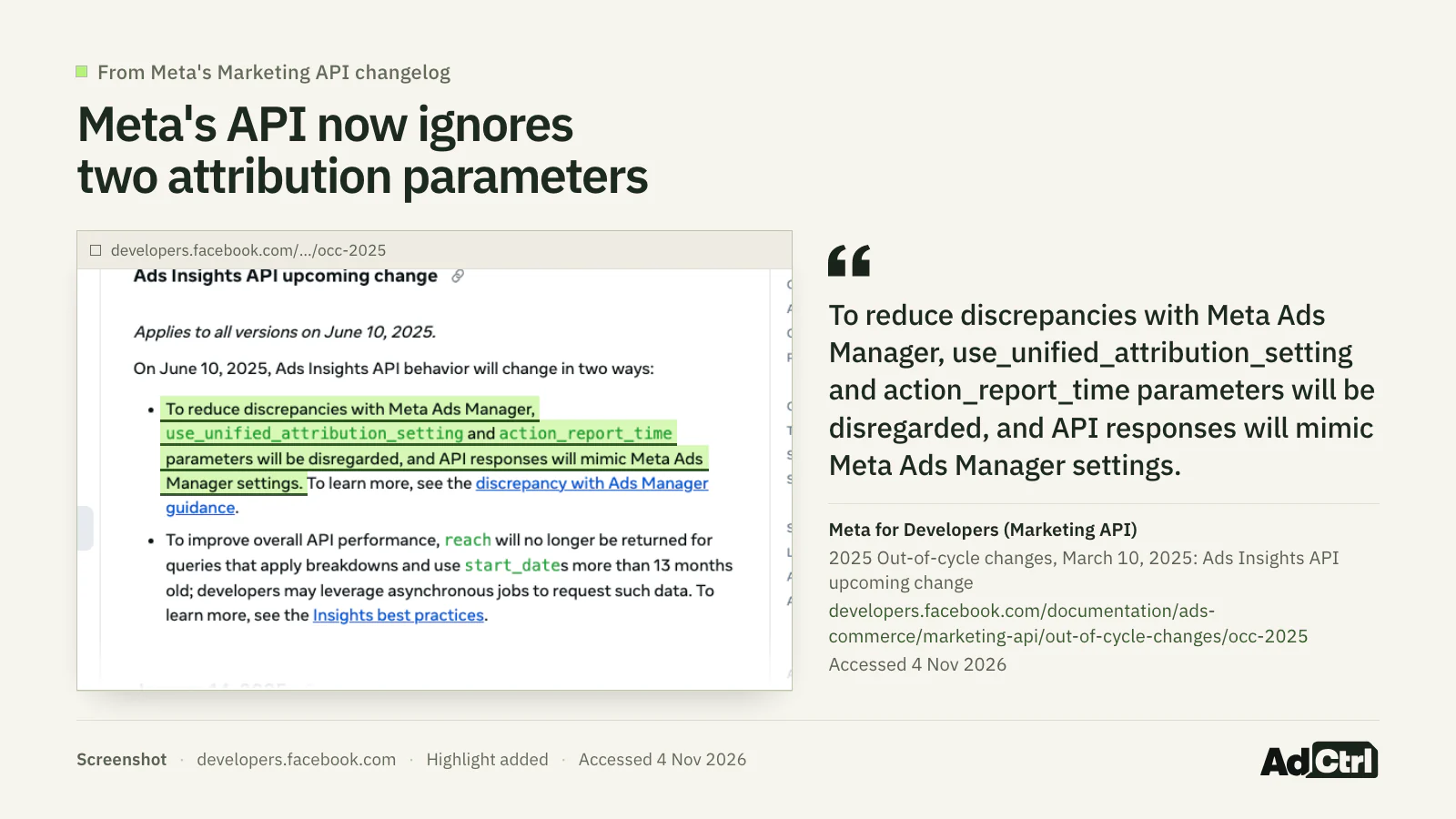
Screenshot of Meta's Marketing API 2025 out-of-cycle changes, 4 November 2026: both parameters "will be disregarded" from 10 June 2025.
- :
action_report_timeanduse_unified_attribution_settingdisregarded - : Meta's changelog:
7d_viewand28d_viewwill return no data - :
7d_viewand28d_viewno longer returned15
A script that still sets action_report_time gets Ads Manager's settings back anyway. Read action_attribution_windows instead. Meta said 1-day click, 7-day click, 28-day click, 1-day engaged view and 1-day view stay available.
In Meta's Insights reference for reads, the default option means ["7d_click","1d_view"]. Meta's help page doesn't say which setting a new ad set gets.
How do you find duplicate conversions in GTM, GA4 and Meta?
Duplicate conversions come from one sale reaching a platform twice: two tags, two triggers, two primary actions, or a pixel and a server event that don't share an ID. Tag Manager's Preview mode is the only check here that shows what actually fired.
- The Google tag isn't both hard-coded in the site and added through Google Tag Manager.
- Each conversion action has one conversion tag in GTM, not two.
- No conversion tag has two triggers that both fire on the same thank-you page.
- In Preview mode, a test purchase fires each conversion tag once in Tag Assistant.
- The same sale isn't primary twice: a GA4 import (
GOOGLE_ANALYTICS_4_PURCHASE) and a website tag (WEBPAGE). - Leads use counting "One" unless every repeat after a click is a real new conversion (my rule of thumb).
- Every purchase sends a transaction ID, and the ID is unique per order.
- The Meta pixel's
eventIDmatches the Conversions APIevent_id, and itseventmatchesevent_name16. - Redirects on your site keep the GCLID intact.
Transaction IDs cut both ways. Google Ads treats a second conversion with the same ID as a duplicate, but "If your tag sends Google Ads the same ID for different transactions, you could significantly undercount your conversions." On Meta, a pixel plus Conversions API setup needs a deduplication method, and Meta's recommended one matches event ID and event name17, 16.
Can your AI run this reconciliation?
An AI assistant can run the reconciliation reads if it is connected to every platform in the comparison. Google's and Meta's official servers each cover their own platform, so you'd connect two or three.
Google Ads MCP server: Google's server; docs give the mode as "Read-only (current release)"18
(Official)
Google Analytics MCP server:
run_reportthrough the Data API, pluslist_key_eventsandlist_google_ads_links(Official)
Meta Ads MCP server:
ads_get_ad_entitiesreturns metrics including conversions; the page names no attribution-window parameter(Official, beta)
AdCtrl: Google Ads, Meta Ads, GA4 and Tag Manager in one Claude or ChatGPT conversation
(Third-party)

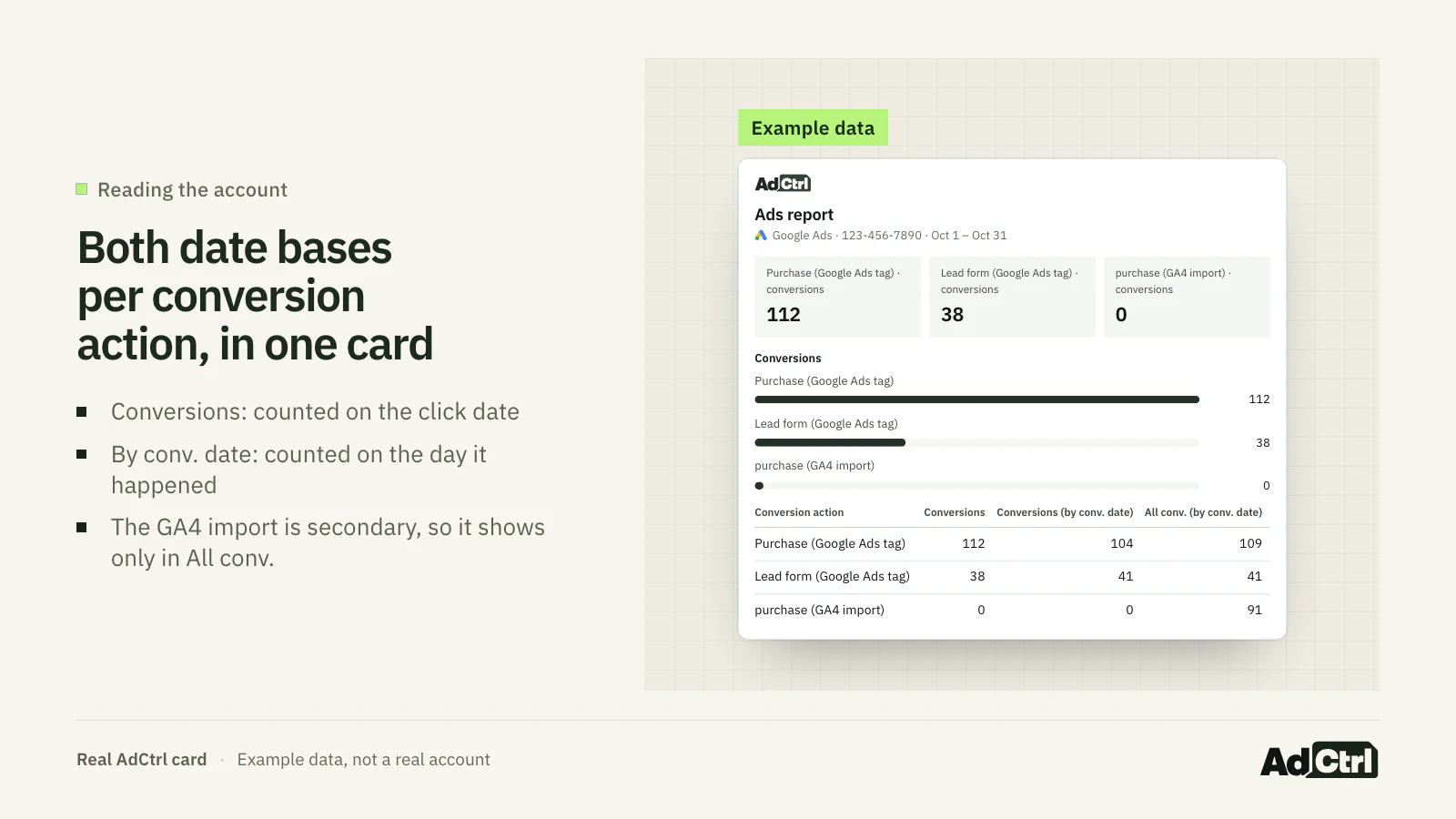
A real AdCtrl report card filled with example data: conversions per conversion action, by click date and by conversion date. Its "(by conv. date)" columns mean the same as Google Ads' "(by conv. time)" columns. The made-up GA4 import shows 0 in Conversions and a count only in All conv., because it is secondary.
Our purchases in Google Ads don't match GA4. Compare last month per conversion action with GA4 key events, tell me which actions are primary, and say which gaps the settings explain and which you can't explain.None of these tools fixes tracking by itself. A Tag Manager read shows configuration, not firing, and a tag hard-coded outside GTM isn't in the container at all. AdCtrl's own comparison lists "no unified attribution model (each platform reports its own conversions)", and AdCtrl does not publish Tag Manager versions; that stays with you19, 20.
Frequently asked questions
Which number should I bid on?
Google Ads bids on the Conversions column, which holds the primary actions; secondary actions are "for observation only" unless they're part of a custom goal. Pick one primary action per sale or lead and keep the rest secondary.
Should I import GA4 conversions or use the Google Ads tag?
Either can count a sale. Trouble starts when both are primary for the same sale. Conversions created from GA4 start as secondary and can only be made primary in Google Ads, so that switch is a deliberate choice you can check.
Why did my GA4 numbers for Google Ads change after 15 June 2026?
Google's page on conversions and key events says that before June 15, 2026, the collection of Google Ads cookies and IDs by the Google Analytics tag was controlled by both Google signals and your Consent Mode settings, and that from that date Google Analytics "transitioned to using Consent Mode (within Google Ads) as the single control for this data." Check your Consent Mode setup before you go looking for a broken tag3.
Can I make GA4 and Google Ads match exactly?
No. Google expects differences "often up to 20%" due to different attribution models, plus invalid-click filtering and reporting lag1, 2. Aim for a gap you can explain and that stays steady.
Why does Meta report a sale that GA4 doesn't give to Meta?
Meta credits a conversion within the ad set's attribution setting, which can include 1-day view-through and 1-day engage-through as well as link clicks. GA4 attributes with its own model and lookback window, so the same sale can land on different channels.
What to do next
Start with the direction: Google Ads higher sends you to duplicates, view-through and modelled conversions. GA4 higher sends you to secondary actions and lost click IDs. Then line up dates, time zones and one action, compare GA4 with All conv. (by conv. time), and use the tree to decide whether what's left is attribution or a duplicate.
Learn more: the Google Ads audit checklist covers the rest of the account, and Google Ads MCP and Meta Ads MCP compare the official connectors.
Try it: connect AdCtrl with the getting started steps, paste the step 1 prompt, and work down the list. Every plan comes with a 3-day free trial, no card needed19.
Sources
- Understand your conversion tracking data, Google. Accessed 4 November 2026.
- Create conversions from Google Analytics events in Google Ads, Google. Accessed 4 November 2026.
- Conversions vs. key events in Google Analytics, Google. Accessed 4 November 2026.
- About attribution models and attribution settings, Meta. Accessed 4 November 2026.
- Manage and configure attribution, Google. Accessed 4 November 2026.
- About primary and secondary conversion actions, Google. Accessed 4 November 2026.
- Understand conversions by time with new columns, Google, 17 October 2019. Accessed 4 November 2026.
- Google Ads API v26: metrics fields, Google. Accessed 4 November 2026.
- Google Ads API v26: ConversionAction, Google. Accessed 4 November 2026.
- Google Ads API v26: ConversionActionType, Google. Accessed 4 November 2026.
- Google Ads API v26: ConversionActionCountingType, Google. Accessed 4 November 2026.
- API Dimensions & Metrics (Google Analytics Data API), Google. Accessed 4 November 2026.
- Ad Account Insights (Marketing API reference), Meta. Accessed 4 November 2026.
- 2025 Out-of-cycle changes (Marketing API), Meta, 10 March 2025. Accessed 4 November 2026.
- Ads Insights API Metric Availability Updates, Meta, 16 October 2025. Accessed 4 November 2026.
- Handling Duplicate Pixel and Conversions API Events, Meta. Accessed 4 November 2026.
- Use a transaction ID to minimize duplicate conversions, Google. Accessed 4 November 2026.
- Google Ads MCP server, Google. Accessed 4 November 2026.
- AdCtrl docs, AdCtrl, 4 November 2026. Accessed 4 November 2026.
- AdCtrl llms-full.txt (comparison table in the Google Ads MCP article), AdCtrl, 4 November 2026. Accessed 4 November 2026.
- Preview and debug containers, Google. Accessed 4 November 2026.
- Method: tags.list (Tag Manager API v2), Google. Accessed 4 November 2026.
- Ads MCP Server: Comprehensive reporting, Meta. Accessed 4 November 2026.
- Google Analytics MCP Server (README), Google. Accessed 4 November 2026.