Negative Keywords Search Terms
Negative keywords in Google Ads: how to find them, where to add them, and why ads still show
A weekly routine that starts from the keyword each search matched, the four levels and their limits, the three match types, and what AI Max and Performance Max do with your exclusions.

By Kaan Catalkaya, Founder of AdCtrl
· 14 min read
Short answer
- Find negative keywords in the search terms report with the Keyword column turned on, which Google hides by default. For each bad term, decide: exclude it, fix the keyword that let it in, or keep it.
- Negative keywords don't match close variants, so plurals and synonyms need their own entries. Casing and misspellings are covered automatically.
- The limits are 10,000 negative keywords per campaign, 5,000 per list, 20 lists per account and 1,000 account-level negatives.
- AI Max respects negative keywords. Performance Max negatives cover Search and Shopping inventory only, and Google's impact forecast for negatives works only in Performance Max, 10 keywords at a time.
Review search terms and prepare negative keywords in Claude or ChatGPT
Start free3-day free trial · no card needed
Negative keywords in Google Ads are words or phrases that stop your ads from showing on searches that contain them. Find them in the search terms report with the Keyword column switched on, so you see which of your keywords let each search in. Then pick a level and a match type for each exclusion.
The whole-account review, search terms included, sits in the Google Ads audit checklist. This page is what you do with each search term once you have it: which to exclude, where the exclusion goes, and why some searches still get through.
Checked 7 November 2026 against Google Ads Help and the Google Ads API v26 reference1.
I build AdCtrl, which connects Google Ads to Claude or ChatGPT, so most steps of the routine below have the exact words to type in AdCtrl next to the manual route.
How do you find negative keywords in the search terms report?
Negative keywords come from the search terms report, which lists the actual searches that triggered your ads, with cost and conversions next to each. The "Keyword" column shows which of your keywords matched each search, and it "doesn't show by default"2.
Turn on the Keyword column before you judge a single term. With it on, every costly search gets one of three calls:
Exclude the term if
- The search is irrelevant and no keyword of yours should have matched it
- It's a word like "jobs" or "repair" that shows up in your own report
Fix the keyword if
- One broad or phrase keyword keeps pulling in the same kind of junk
- Tightening its match type would stop the problem at the source
Keep it if
- The search fits what you sell and simply hasn't converted yet
- It's below your cut-off, so it hasn't had a fair chance
I'd fix the keyword before writing the tenth negative against it.
Which terms need a call? My rule of thumb, not Google's advice: a term whose cost has passed your target cost per conversion, with zero conversions, gets a decision this week. That's your cut-off, set by your own target.
To add negatives from the report, check the boxes next to the search terms you want to exclude and add them as negative keywords. Google then lets you put them on an ad group or campaign, an existing negative keyword list, or a new list, and in a Search campaign they come in as negative exact match by default3. Change the match type there if you want a theme blocked.
Google omits search terms that "don't have enough query activity" for privacy reasons, so some spend never shows up as a term you can exclude. And when you view the report through Report editor, you can't add negative keywords from it.
Which match type should a negative keyword use?
Negative keywords use the same three match types as normal keywords, but Google says they "work differently than their positive counterparts".
Negative broad match is the default, and it blocks a search that "contains all your negative keyword terms, even if the terms are in a different order". Negative phrase blocks searches with the exact terms in the same order. Negative exact blocks only the exact terms, in the same order, "without extra words"4.

Illustration of one negative, "running shoes", under each match type and Google's example searches: broad blocks three, phrase two, exact one. None of them blocks the singular "running shoe", because negatives don't match close variants.
The same rules as a table, with the searches from the illustration:
| Search | Broad: running shoes | Phrase: "running shoes" | Exact: [running shoes] |
|---|---|---|---|
| running shoes | Blocked | Blocked | Blocked |
| blue running shoes | Blocked | Blocked | Shows |
| shoes running | Blocked | Shows | Shows |
| running shoe | Shows | Shows | Shows |
| blue tennis shoes | Shows | Shows | Shows |
The same negative blocks a different set of searches under each match type. The singular "running shoe" gets through all three, because negatives don't match close variants.
Source: Google Ads Help, About negative keywords4
The singular is the trap. Negative keywords won't match close variants, so excluding "running shoes" does nothing to "running shoe". Add singular and plural forms and synonyms yourself. Casing and misspellings are handled for you.
For match types, my rule of thumb is phrase for a theme you never want, like "jobs" or "repair", and exact for one search you want gone while its neighbours keep showing, like "free running shoes". Broad only when the words could come in any order.
Should a negative keyword go on the ad group, campaign, a list or the account?
A negative keyword can sit at four levels, and the right one depends on how far the exclusion should reach. Ad group negatives steer searches between your own ad groups. Campaign negatives stop waste in one campaign. A negative keyword list shares one set of exclusions across many campaigns. Account-level negatives apply to "all search and shopping inventory" in Search, Performance Max, App, Shopping, Smart and Local campaigns.
Ad group or campaign if
- The search is wrong for one campaign but fine for another
- One ad group's keyword keeps catching searches meant for another ad group
A shared list if
- The same theme is wrong for several campaigns, such as job seekers
- You want one place to update it
The account if
- The term is never relevant anywhere in the account
- It belongs on a short list of terms you never want, such as brand-safety words
Each level has a hard limit:
- 10,000 negative keywords per campaign5
- 5,000 keywords per negative keyword list
- 20 negative keyword lists per account
- 1,000 account-level negative keywords
The campaign and list limits are on Google's account limits page, and the 1,000 account-level cap is on its account-level negatives page6. Keep account-level negatives for terms you never want, since 1,000 fills up fast if every bad search goes there. Display Network and Video campaigns consider at most 1,000 negative keywords.
You add account-level negatives under Admin, then Account settings, then the "Negative keywords" section. Shared lists live under Tools, then Shared library, then Exclusion lists, on the "Negative keyword lists" tab, and each list has to be applied to the campaigns it should cover7.
When you add negatives to a campaign, Google also lets you save them to a new or existing list and apply that list to the campaign in the same step.
Do negative keywords work with AI Max and Performance Max?
Negative keywords work with AI Max and Performance Max, but they reach different inventory. AI Max respects your negatives, and Performance Max applies them to Search and Shopping only:
| Campaign | Negatives that apply | What they block |
|---|---|---|
| Search | Ad group, campaign, shared list, account | Searches on Search ads |
| Search with AI Max | The same; "respected even with AI Max turned on" | Also AI Max's extra searches, shown as match type "AI Max" in the search terms report |
| Performance Max | Campaign negatives, shared lists, account-level negatives | Search and Shopping inventory only, not YouTube, Display or Gmail |
Where each kind of negative keyword reaches. Account-level negatives cover Search and Shopping inventory in Performance Max too, without adding anything to the campaign.
Source: Google Ads Help on AI Max, how AI Max works, negative keywords in Performance Max and account-level negatives6, 8, 9, 10

Screenshot of Google's AI Max FAQ, read on 7 November 2026, with the answer highlighted: negative keywords are respected with AI Max on.
Performance Max has one tool Search doesn't. Preview impact predicts what a negative will cost you in conversions or conversion value, shown as a percentage, but it's "only available for Performance Max campaigns" and handles up to 10 keywords at a time11. For Search and AI Max campaigns you judge the risk from the search terms report yourself.
If you're not sure whether AI Max is on in your campaigns, the audit checklist has the check.
The weekly search-term routine
A weekly search-term routine takes five steps, from the report to a change you can check. The cut-off is my rule of thumb from above, your own target cost per conversion; the matching and level rules in the steps are Google's.
Turn on the Keyword column and pull the search terms.
Manual: open the search terms report, add the Keyword and Match type columns, set the date range and sort by cost.
With AdCtrl: paste the read prompt from the "Run it with AdCtrl" section below.
Sort each term past your cut-off into exclude, fix the keyword, or keep.
Manual: read the matched keyword and match type next to each term; read AI Max terms with their source column.
With AdCtrl: write "Group the search terms that cost money without converting by the keyword they matched, and mark which keywords keep matching unrelated searches."
Choose the level and match type for each exclusion.
Manual: first look at the negatives you already have on the ad group, campaign, shared lists and account, so you don't add a duplicate or block a keyword you bid on. Then use the decision above, and add the other forms of each word, singular or plural, as separate entries.
With AdCtrl: write "Make them campaign-level negatives on Search – Running shoes: phrase match for jobs and repair, exact match for free running shoes." Negatives on ad groups, lists or the account stay manual.
Preview the change before it goes live.
Manual: in Performance Max, use Preview impact; elsewhere, compare the batch against your own keywords.
With AdCtrl: send the preview request from the "Run it with AdCtrl" section; you get the list back, unapplied until you say "apply".
Apply, then check it's there.
Manual: add the negatives, open the campaign's negative keywords to confirm them, and look for the same searches in next week's report.
With AdCtrl: write "Show the campaign-level negative keywords on Search – Running shoes now."

Illustration of the routine in five steps: turn on the Keyword column, sort each term into exclude, fix the keyword or keep, choose level and match type, preview, then apply it and check it's there.
A short version to run each week:
- The Keyword column was on before any term was judged.
- Every term past your target cost per conversion with zero conversions has a decision.
- AI Max terms were read with their source column.
- No new negative overlaps one of your own keywords.
- Plural and singular forms went in as separate negatives.
- Last week's excluded searches are gone from this week's report.
Why does my ad still show for a search I excluded?
Google's own matching rules give five reasons an ad can still show for a search you excluded. Find the campaign and match type that served it in the search terms report, then match it to one of these causes:
| Cause | Example | What to do |
|---|---|---|
| A close variant got through | "running shoe" still serves after you exclude "running shoes" | Add singular, plural and synonyms as their own negatives |
| The search ran past 16 words | Your negative comes after the 16th word of a long search | Accept it; Google says the ad "might still show" here |
| The negative sits on the wrong level | A negative in campaign A, the search served in campaign B | Add it where the search landed, or use a list or the account |
| Another campaign picked up the search | AI Max and Performance Max are both eligible; the higher Ad Rank serves | Exclude it in the campaign that actually served it |
| The match type is too narrow | Exact [running shoes] lets "blue running shoes" through | Use phrase for the theme |
Five reasons an excluded search still triggers an ad, each from Google's own matching rules. The search terms report shows which one applies.
Source: Google Ads Help on negative keywords and the AI Max FAQ4, 9
How many negative keywords is too many?
There's no fixed "too many" for negative keywords below Google's hard limits; the cost shows up as lost reach. Google's own wording is that "if you use too many negative keywords, your ads might reach fewer customers"4, and its Performance Max forecast page warns that negatives can "unexpectedly limit your reach".
A negative that overlaps your own keyword blocks it. Google's help says outright that overlap "will cause your ad not to show"7. A broad negative "cheap" stops every search containing "cheap", including the ones your keyword "cheap running shoes" was bought for. If a campaign slowed down after a round of exclusions, Google Ads not spending walks through the status and impression share checks.
Competitor names follow the same logic. Exclude them in campaigns where they waste money, but if you run a campaign that bids on competitors on purpose, keep them off the account, and off any shared list applied to that campaign, because those would block it too.
Run it with AdCtrl: read, preview, apply
With AdCtrl you do the read and the campaign-level negatives from Claude or ChatGPT. Adding negative keywords counts as an edit, so you see the list first and nothing changes in Google Ads until you approve it12. Start with the read:
Show search terms for the last 30 days with the keyword and match type each one matched on, plus cost and conversions. Sort by cost.
A real AdCtrl read card filled with example data for Fernhill Running, a fictional shop: 30 days of search terms, each next to the keyword and match type it matched on. Terms like "repair", "jobs" and "free" spent money without a conversion. The shop and numbers are made up.
Then ask for the negatives:
For the campaign Search – Running shoes, prepare campaign-level negative keywords for the search terms we marked as exclude: phrase match for themes like "repair", "jobs" and "used", exact match for single searches like "free running shoes". Add singular and plural forms. Show me the list before anything changes.
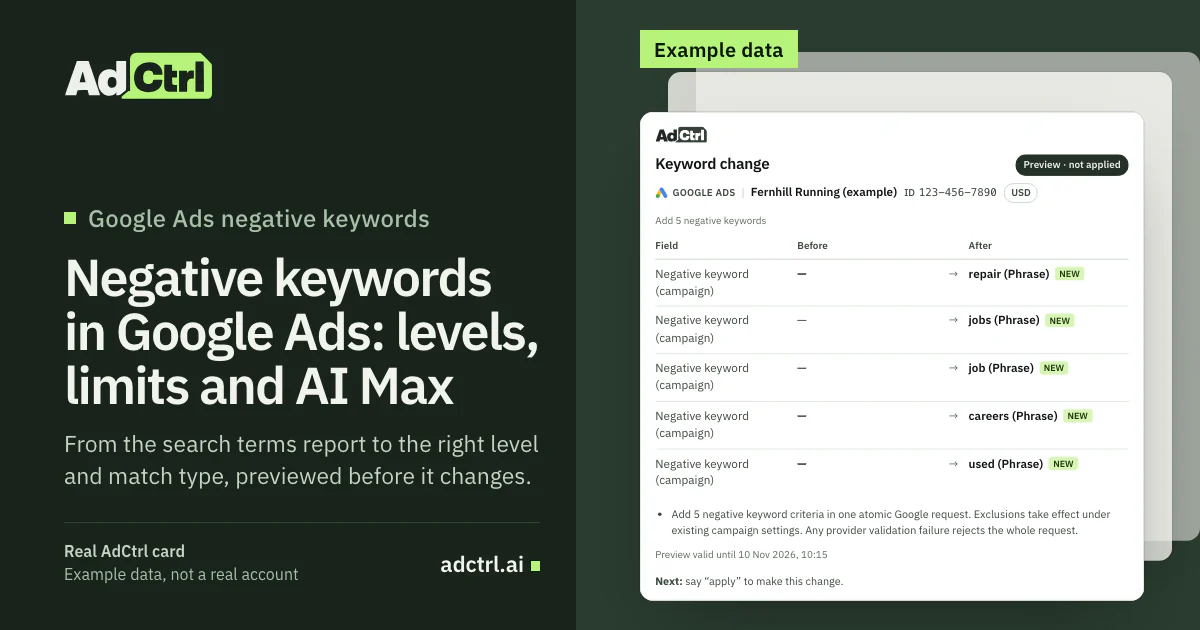
A real AdCtrl change preview filled with example data: 12 campaign-level negatives for the campaign Search – Running shoes, nine phrase and three exact, marked as not applied until you say "apply". The shop and its keywords are made up.
After you approve, ask for the campaign's negative keywords again and check what Google now holds instead of trusting the confirmation.
The routine here stays at campaign level. Account-level negatives, ad group negatives and shared negative keyword lists are manual steps in Google Ads, as are Performance Max search terms. For how hosts handle approvals and permissions, see Claude for Google Ads.
What other tools find negative keywords?
Other tools find negative keywords too, and some go further on bulk analysis. Optmyzr's Negative Keyword Finder breaks the search terms report into single words and adds up their data, so a word that wastes money across many searches stands out13. Adspirer and GoMarble run the review through an AI connection.
Google Ads: Search terms report, negatives at four levels; Preview impact for Performance Max
(Built in)
Optmyzr: "identifies individual words that are part of the search queries and are not performing well", then uploads negatives in bulk
(Tool)
Adspirer: A "Negative Keyword Miner" skill that recommends exact, phrase or broad; "applied on approval"
(Connector)
GoMarble: A Python script that flags wasted-spend terms, checks them against your negative list and clusters the rest
(Workflow)
AdCtrl: Search terms with the matched keyword in Claude or ChatGPT; campaign-level negatives as a preview you approve
(Connector)

For thousands of terms, word-level analysis and clustering save time, which is what Optmyzr and GoMarble are built for. A preview-and-approve step isn't unique either, since Adspirer also asks for approval. Pick the one that fits how many terms you review and where you already work.
Pull search terms with the matched keyword (GAQL)
GAQL, the Google Ads Query Language, pulls the same report from a script or the API. The search_term_view resource holds the search term, and the segments.keyword.info fields add the keyword it matched:
SELECT search_term_view.search_term, search_term_view.status, segments.keyword.info.text, segments.keyword.info.match_type, metrics.cost_micros, metrics.conversions FROM search_term_view WHERE segments.date DURING LAST_30_DAYS
search_term_view.status tells you whether a term is already one of your targeted or excluded keywords, and metrics.cost_micros is in micros, where one million is one unit of currency. Performance Max terms aren't in this view: Google says to use campaign_search_term_view for them1.
Frequently asked questions
Can I copy someone else's negative keyword list?
Use one as a list of ideas to check, not a list to paste in. Someone else's list doesn't know which words your keywords bid on, so it can block searches you pay for on purpose. Check each candidate against your own search terms and keywords first.
Does AI Max ignore negative keywords?
No. Google's AI Max FAQ says negatives are respected with AI Max on. If an excluded search still shows, look for a close variant, a longer search or another campaign that served it.
Can negative keywords block my own keywords?
Yes. A negative that overlaps one of your keywords stops that keyword's ads from showing. Compare every new batch against your keyword list, especially broad negatives built on one common word.
Should negatives be phrase or exact by default?
Negative keywords default to broad, but negatives you add from the search terms report to a Search campaign default to exact3. Phrase suits themes you never want, because it blocks the words in that order with anything around them; exact suits one search you want gone while its neighbours keep showing.
What to do next
Turn on the Keyword column, pull last month's search terms, and make a call on every term whose cost has passed your target cost per conversion without a conversion. Put each exclusion at the narrowest level that covers it, add the plural and synonyms, and check the batch against your own keywords before it goes live.
Learn more: the Google Ads audit checklist runs the search-term checks across a whole account, and Google Ads MCP compares the ways to connect the API to Claude or ChatGPT.
Try it: connect AdCtrl with the getting started steps, paste the read prompt above, and prepare your first campaign-level batch as a preview. Try any plan free for 3 days, no card needed12.
Sources
- Google Ads API v26 field reference: search_term_view, Google, 30 October 2026. Accessed 7 November 2026.
- About the search terms report, Google. Accessed 7 November 2026.
- Get negative keyword ideas using the search terms report, Google. Accessed 7 November 2026.
- About negative keywords, Google. Accessed 7 November 2026.
- About your Google Ads account limits, Google. Accessed 7 November 2026.
- About account-level negative keywords, Google. Accessed 7 November 2026.
- Add negative keywords to campaigns, Google. Accessed 7 November 2026.
- Negative keywords in Performance Max campaigns, Google. Accessed 7 November 2026.
- Frequently asked questions about AI Max for Search campaigns, Google. Accessed 7 November 2026.
- How AI Max for Search campaigns works, Google. Accessed 7 November 2026.
- Estimate the impact of adding negative keywords to your Performance Max campaign, Google. Accessed 7 November 2026.
- AdCtrl docs: connect Google Ads and Meta Ads to Claude or ChatGPT, AdCtrl, 6 November 2026. Accessed 7 November 2026.
- Negative Keyword Finder, Optmyzr, 15 July 2026. Accessed 7 November 2026.
- Negative Keyword Miner skill, Adspirer. Accessed 7 November 2026.
- Search term mining workflow, GoMarble, 1 September 2026. Accessed 7 November 2026.
- Google Ads API v26 field reference: campaign_budget, Google, 30 October 2026. Accessed 7 November 2026.